1
Chapter
Using the Trial Balance
7
Converting Trial Balance Data from GoSystem Audit
You can convert GoSystem Audit client data from version 3.0 or higher. The conversion
transfers account numbers, account descriptions, account balances (current period and all
prior periods), leadsheet codes, leadsheet subcodes, grouping code 1, grouping code 2,
consolidation codes, and tax codes.
You can also map your existing GoSystem Audit codes to a standard list of grouping codes
set up in ProSystem fx Engagement.
Reviewing the GoSystem Audit Client
Open the client in GoSystem Audit. Make note of the following information, so you choose
the correct selections during conversion:
§
§
§
Entity type: C Corporation, S Corporation, Partnership, or Non-Profit.
Fiscal year end and current period end.
Number of periods in the year.
Preparing the Client, Binder and Trial Balance
To prepare for the conversion in ProSystem fx Engagement, do the following:
1. Create a client for the client you want to convert. See Creating New Client Folders on
page 5-7 for more information.
2. Create a binder for the client. See Using the New Binder Wizard on page 6-2 for
information. Set the current period dates to agree with the current period dates set up in
GoSystem Audit.
Note: If the current period in GoSystem Audit has journal entries, be sure
to select the balance type during conversion that reflects the journal
entries. The conversion does not bring over the detail of the journal
entries. It does bring over the net balance after journal entries.
3. Create a trial balance for the client. See Creating Trial Balances on page 7-8 for more
information.
Set up the necessary columns (i.e., current year columns and prior year columns). Also,
if you choose to map your existing GoSystem Audit grouping codes to a new list of
ProSystem fx Engagement grouping codes, make sure the new list exists in the trial
balance.
Transferring Data from GoSystem Audit
To transfer data from a GoSystem Audit client, do the following:
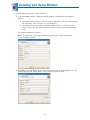
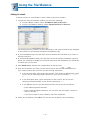
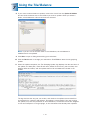
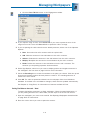
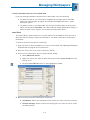
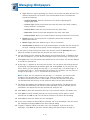
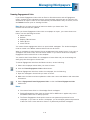
1. Start the Import Conversion Wizard by doing one of the following:
§
§
From the Binder window, select Trial Balance/Import Conversion Wizard.
From the Trial Balance window, select Engagement/Import Conversion Wizard.
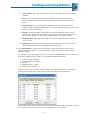
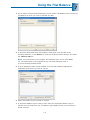
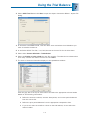
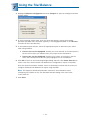
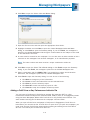
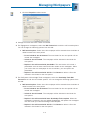
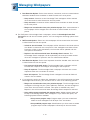
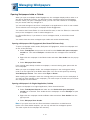
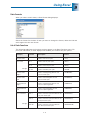
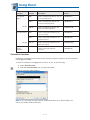
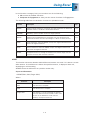
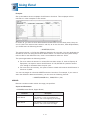
2. Select GoSystem Audit 3.0 or higher and click Next.
7 - 28