1
3. DESCRIPTION OF FRONT PANEL
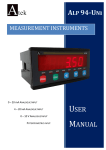
ALC44 device operates in 2 different modes:
Programming mode
Operating modu
: Specifies the function used during programming.
: Specifies the function used during operating.
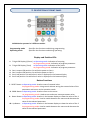
Display and Position LEDs
1. 7 Digit LED Display (9,2mm) at Operating mode: Indication of counting
At programming mode: Indication of program parameter
2. 7 Digit LED Display (7mm) at Operating mode: Indication of Set value.
At programming mode: Indication of program parameter
3. Out-1 output LED position: On while the power at Out-1.
4. Out-2 output LED position: On while the power at Out-2.
5. Set-1 Led position: On while Set-1 value is displayed in the bottom display
6. Set-2 Led position: On while Set-2 value is displayed in the bottom display.
Button Functions
7. RESET Button at Operating mode: Used to reset of counted value.
At programming mode: Using to exit without saving the entered value of the
parameter and return to the operation mode.
8. PROG Button at Operating mode: Used to return to the menu.
At programming mode: Used to save and enter menu parameter value.
9. Down Button at Operating mode: Used to in the bottom display to show the value of Set-1.
At programming mode: Used to switch between the menus and decrease the
value of the selected parameter.
10. Up Button at Operating mode: Used to in the bottom display to show the value of Set-2.
At programming mode: Used to switch between the menus and decrease the
value of the selected parameter.
-4-