1
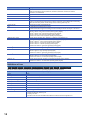
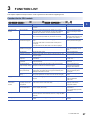
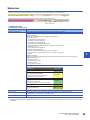
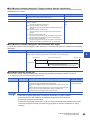
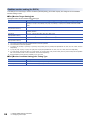
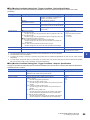
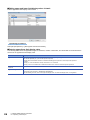
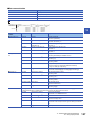
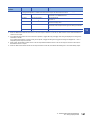
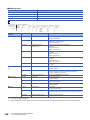
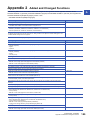
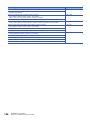
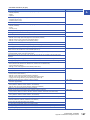
Function list for Data logger
RCPU
R Analog
High Speed Data Logger
High Speed Data Communication
Q Analog
LCPU
L Analog
BOX Data Logger
Others
Item
Description
Reference
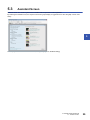
Assistant function
A function to guide users unfamiliar with the operation of GX
LogViewer.
Page 35 Assistant Screen
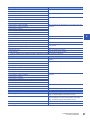
Connects a personal computer to Data logger on a 1:1 basis.
They can be easily connected without concerning the IP address.
Page 50 Connecting to Data
logger/Data communication
Connection setup
function
Direct connection
Searching modules
Searches for and connects to Data logger on the network.
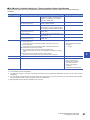
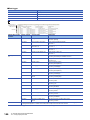
Trend graph function
Displaying trend graph
(Historical trend graph)
Displays past data sampled by the data logging function on the trend
graph.
Data saved in CSV files/binary files is displayed.
Page 60 Displaying logged
devices (Historical trend graph)
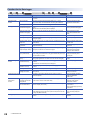
Displaying trend graph
(Realtime trend graph)
Displays current data sampled by Data logger on the trend graph.
Page 61 Displaying current
device status (Realtime trend
graph)
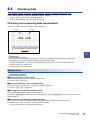
Checking data
Checks data using cursors.
Page 73 Checking Data
Operating trend graph
Operates a trend graph (such as aligning, widening/narrowing, and
moving the graph).
Page 76 Operating Trend Graphs
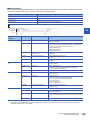
Changing display item in
graph area
Changes display items in a graph area (such as multiple cursors and
cursor labels).
Page 94 Changing Display Items
in Graph Area
Changing graph
appearance
Changes graph appearance (such as color and type of the graph, and
graph line thickness).
Page 98 Changing Graph
Appearance
Registering/reflecting
graphical display settings
Registers the display setting information of the trend graph being
displayed, and reflects it to another trend graph.
Page 101 Registering and
Reflecting Graphical Display
Settings of Trend Windows
Reflecting graphical
display automatically
Stores the graphical display information being displayed by each label
group setting, and reflects them to the graph automatically when open
the trend window next time.
Page 103 Reflecting Graph
Display Automatically When
Opening File
Initializing graphical
display
Restores changed graphical display to the initial state (the state in
which graph appearance such as the color has not been changed).
Page 103 Initializing Graph
Display
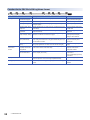
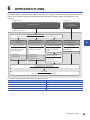
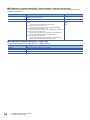
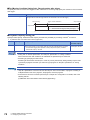
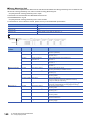
Displaying event list
(Historical event list)
Displays past events sampled by the event logging function in an
event list.
Event saved in CSV files/binary files is displayed.
Page 112 Displaying Event List
Displaying event list
(Realtime event list)
Displays ongoing events sampled by the event logging function in an
event list.
Operating event list
Operates an event list (such as sorting and filtering).
Page 114 Operating Event List
Changing display
settings of event list
Customizes the display settings of event list (such as font color and
display items).
Page 121 Changing Display
Settings of Event List
Logging file save function
A function to save logging files saved in the memory card to a
personal computer.
Page 123 SAVING LOGGING
FILES TO PERSONAL
COMPUTER
Window/
folder restore
function
Adding/restoring
frequently-used window
configurations
Adds window layout and data of the trend window displayed frequently
to the menu in order to restore them easily.
Page 126 Adding/Restoring
Frequently-Used Window
Configuration to Menu
Redisplaying recentlyused windows/folders
Adds windows or folders recently used to the menu automatically in
order to redisplay those easily.
Page 127 Redisplaying RecentlyUsed Windows
Page 127 Redisplaying RecentlyUsed Folders
Displayed data/event save function
A function to save the data being displayed in the trend graph and the
events displayed in the event list to a personal computer as CSV file
or image file (BMP/JPG/PNG).
Page 128 Saving Displayed Data
Page 145 Saving Displayed
Events
Trend graph print function
A function to print the trend graph being displayed with the trend graph
function.
Page 148 PRINTING TREND
GRAPHS
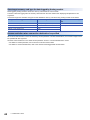
Event monitoring
function
28
QnUDVCPU
3 FUNCTION LIST