1
Transporting Smart Reader
• Use caution if you are repositioning the Smart Reader a
short distance across a desk or table. Make sure you do not
pull on any power cords or connector cables.
• Disconnect and secure all power and video cables before
moving the unit.
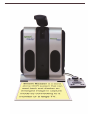
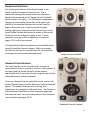
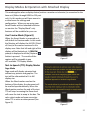
• Carry the unit only by the recessed handle located on the
back. Do not carry Smart Reader by the Camera Arm. (see
Figure 3)
Caring for Smart Reader
• Always turn the power OFF by pressing the green power
Figure 3
button on the side of the device when Smart Reader is not in
use. (Please avoid trying to Shut Down the device by spontaneously removing from power)
• Ensure that your Smart Reader is completely OFF before cleaning.
• Clean the Smart Reader with a soft dry cloth or an electrostatic dusting cloth. DO NOT use
liquid cleaners on its plastic surfaces.
• The protective glass covering the camera can be cleaned as needed with the lens cloth
provided within the packaging of the Smart Reader.
Susceptibility to Interference:
There may be temporary degradation of the image when the Smart Reader is subjected to a
strong radio frequency field, electro-static discharge or transient electrical noise. An electrostatic discharge (caused by static electricity) may cause the screen to go blank. If this happens,
disconnect the AC power from the electrical outlet, wait 30 seconds, and connect the AC
power again.
6