1
PARAMETERS MANAGER 2.10 - USER MANUAL
Using Parameters Manager
6. Disconnect the instrument serial port.
5.7
Display the I/O state of the instrument
Operate as indicated:
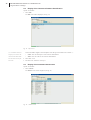
1. Select I/O.
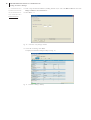
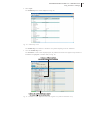
The I/O screen will be displayed (see Fig. 20).
Fig. 20 - I/O screen.
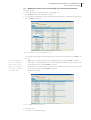
(15) to show/hide the columns, use
The list that follows supplies a brief description of the data given in the I/O screen columns
the right key on the mouse to click
•
Name: states the description of the I/O
on the name of the column and then
•
Value: states the current value of the I/O
select the column from the quick
•
Map: states the value of the state on the basis of factory setting
•
Measure unit: states the unit of measurement of the I/O.
choice menu
2. Select File > Exit.
3. Disconnect the instrument serial port.
(18)
(15)
:
25