1
VCRWorX – User’s Manual
VCRWorX Alarm Data Replay
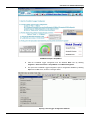
An overview of VCRWorX alarm data replay is shown in the figure below. VCRWorX replays alarm
data from the active AlarmWorX Server configuration database, which is configured using the
Unified Data Configurator.
NOTES
Although the AlarmWorX Logger can log data to multiple databases, VCRWorX can only replay
alarms from one database.
VCRWorX alarm replay does not support alarms coming from Oracle databases.
VCRWorX alarm replay does not work with alarm databases that were created using versions of
ProcessView prior to version 8.0.
Overview of VCRWorX Alarm Data Replay
VCRWorX Quick Start Example
The ProcessView installation provides a VCRWorX_Example.gdf as an example of how to set up
VCRWorX data replay in a GraphWorX display:
1.
6
Browse to the C:\Program Files\Smar \ ProcessView \ Examples\VCRWorX Examples
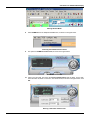
directory and open the VCRWorX_Example.gdf file. The file opens in GraphWorX, as shown
in the figure below.