1
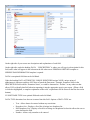
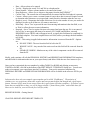
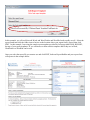
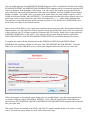
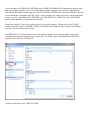
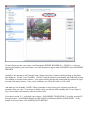
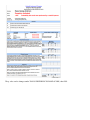
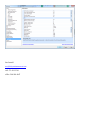
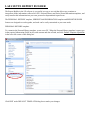
o o o o o o o o o o Date - Allows a date to be entered Yes/No - Displays the words 'Yes' and 'No' in a dropdown list. Phone Number - Allows a phone number to be entered in format '___-___-____'. Drug Reference - Allows you to choose a drug name from the drug reference. Current Time - The current time will automatically be entered into this field when it is present. Custom - Allows you to create a custom format to restrict how data is entered. Requires a mask to determine what characters are accepted and a mask literal to determine what the user sees Height (# rows) - Determines the height of this item. Set it to the number of rows you need to be displayed in order to fit all the text you want to enter into it. Read-Only - Set to 'True' to prevent the user from entering information in the data field, or set to 'False' to allow the user to enter information. Required - Set to 'True' to require this item to be entered and warn the user if it is not entered. Set to 'False' to not require this item to be entered. (EX: NAME and DOB are currently REQUIRED (set to TRUE) and (will appear in red), to signify this field must be completed) in the default template. You must complete these two fields, unless you change the data attribute to FALSE. STRIP - This setting is applied when sensitive information is removed from the PF. Options are: DO NOT STRIP - The text from this field is left in the PF. WHOLE VALUE - Any match of the entire text from this field will be removed from the PF. SEPARATE WORDS - Matches on any of the value's component words will be removed from the PF. Ideally, each examiner will edit the PERSONAL HISTORY and SERIES/EXAM INFORMATION templates, and add fields for information that are on your report form(s) and delete fields that are of no interest to you. Once you have customized the two templates by adding TABLES or ROWS and deleting un-necessary TABLES or ROWS, click OK at the bottom of the EDIT DEFAULT TEMPLATE dialog box. You are now ready to incorporate your report forms into the LX software. Your newly customized templates for PERSONAL HISTORY and SERIES/EXAM INFORMATION will be available in the next new PF file you create. Lafayette does have only one example report template and is called “FinalReport”. The majority of examiners are very proprietary about their reports and have put much effort and thought into a good report format. Because of this, most do not want to share their report forms with other examiners. If you have report forms that you would like to share, we will be happy to build a “forms library folder” and include these for others to use. And Pat, yours will be the first I ask for (wink). REPORT BUILDER – Getting Started Click FILE>REPORT>EDIT REPORT TEMPLATE.