1
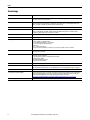
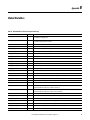
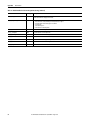
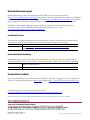
Preface Terminology 8 Term (abbreviation) Definition Application Sequence Programs User-modified programs that work together with the standard state machine logic to control what the machine does while in the abort, clear, reset, run, and stop states. Auto/manual operation When the PanelView™ 800 terminal is in Auto mode, the controller logic controls the machine and monitors machine status. When the PanelView 800 terminal switches to Manual mode, the terminal takes over control. Command buttons and numeric entry fields are available only when the machine is in Manual mode. Bill of Materials (BOM) A list of components that are needed for your system. Building block (BB) Tools to accelerate and simplify the development of a Micro800 controller-based application. A typical building block includes a starting Bill of Material (BOM), Computer-Aided Design (CAD) drawings, Micro800 controller programs, PanelView 800 terminal applications, and a quick start document. Computer-Aided Design (CAD) A computer-based system that is developed to facilitate design of mechanical parts. Connected Components Accelerator Toolkit (CCAT) Software with application files and other information to speed the design and startup of component-based machines. CCAT project A project that consists of these items: • A ProposalWorks™-based bill of materials • A set of CAD drawings (dimensions and schematics) • A Connected Components Workbench project • HMI screens • A set of Quick Start documents • A project document with information about the project components and links to reference materials Connected Components Workbench™ software Software environment to configure or program Micro800 controllers, PanelView 800 terminals, PowerFlex® drives, and other component-level products. Connected Components Workbench project A project that consists of one or more of these items: • Micro800 controller configuration • Up to 256 Micro800 programs, each with program local variables • Micro800 global variables • PanelView 800 terminal application • PowerFlex drive parameter lists Global variables Project variables that any program can access, which includes all I/O and system variables. State Machine control code Machine logic to coordinate overall machine operation that is based on states. The state machine broadcasts commands and receives feedback information from each of the building blocks via user-modified application sequence programs. Tags A PanelView 800 term for variables. User-defined Function Blocks (UDFBs) Function block instructions that can be used like standard function block instructions within any Connected Components Workbench programming language. Anyone who uses Connected Components Workbench software can write these functions blocks. Many UDFBs are posted on the Rockwell Automation sample code website: http://samplecode.rockwellautomation.com/idc/groups/public/documents/webassets/sc_home_page.hcst. User-defined Object (UDO) A collection of PanelView 800 terminal screen objects that can be pasted into a new screen. Rockwell Automation Publication CC-QS028C-EN-P - August 2015