1
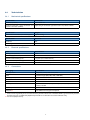
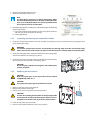
1. Remove the Humidity Indicator Card.
2. Check the Humidity Indicator Card.
Note
The ideal RH for electronics is between 40 and 60%. When
the “Current Humidity Indicator” dis-plays an RH of about 6070%, it is most likely that there is a moisture problem inside
the modem and action must be taken.
3. If the Humidity Indicator Card displays an RH of above 60%, the following
steps must be taken:
a. Inspect the condition of the modem and the sealing of the enclosure
and dust caps. There should be no damage.
b. Contact Eijkelkamp.
5.3.5
Inspecting and cleaning the inside of the modem
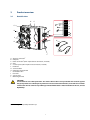
1. Check the inside of the modem for dirt, dust, humidity and damage. Pay special attention to the sealing of the front
cover and the flash ridge.
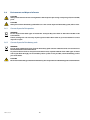
WARNING
The modem must be free from dirt, dust, humidity and damage. Only clean the seal and flash ridge
with a clean lint-free cloth if necessary. Never touch the electronics of the printed circuit board (PCB)!
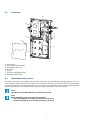
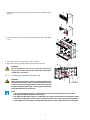
2. Check the sealing edges (A) in the front and back cover. The sealing edges
must be free from dirt and damage (e.g. burrs).
A
3. If required, clean the sealing edges with a lint-free cloth and some solvent,
such as benzene, brake cleaner or something similar.
CAUTION
Do not use greasy substances and agents, such as white spirit,
acetone or thinner.
5.3.6
Replacing the desiccant kit
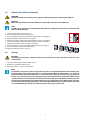
CAUTION
Only use original parts. A new desiccant kit can be ordered
at Eijkelkamp. Refer to 6.1.
CAUTION
Act quickly during the replacing of the desiccant kit!
1. Open the clip of the desiccant holder (B).
2. Remove the old desiccant bag (A).
3. Place the new desiccant bag into the desiccant holder.
CAUTION
The new desiccant bag must be taken out of its package at the
last moment. It must be protected against all kinds of moisture before it is placed in the dry enclosure of the modem.
4. Close the clip of the desiccant holder.
5. Place the new Humidity Indicator Card in the enclosure.
21
B
A