1
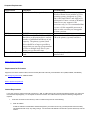
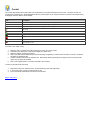
Computer Requirements:
Requirement
CPU
Minimum
1 GHz Pentium 3 (or equivalent)
RAM
Hard drives
512 MB
70 GB internal (ATA, SATA, or SCSI)
hard drive as the primary drive, and any
number of additional hard drives of any
capacity. The primary (system) hard
drive should be as large as possible to
ensure that you can copy a large number
of files or multiple large files to your
home server at the same time.
Network interface card 100 Mbps Ethernet network interface
card.
Recommended
Pentium 4, AMD x64, or newer processor.
Windows Home Server includes a 32-bit
operating system, which runs on 32-bit
and 64-bit (Intel EM64T and AMD x64)
architectures. Future versions of Windows
Home Server may support 64-bit
processors only, so it is recommended that
you use a 64-bit compatible processor in
order to make sure that you can upgrade
to future versions.
Same as the minimum
At least two internal hard drives with 300
GB as the primary (system) hard drive
100 Mbps (or faster) Ethernet network
interface card.
Back to System Requirements
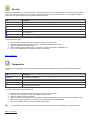
Requirements for IP Cameras
Support for over 50 IP camera models, Internet cameras (like traffic cameras), and USB video cams (JPEG, MJPEG, and MPEG4).
See Configuring Cameras for additional details.
Back to System Requirements
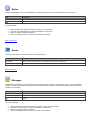
Internet Requirements
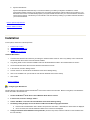
If you have access to a full-time Internet connection (i.e. DSL or Cable service), WL3 provides the gateway between your home and
the Information Superhighway. To accomplish an Internet connection from a WL3 Client Computer, the following configuration is
required:
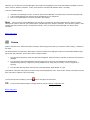
1.
A full-time connection to the Internet (i.e. DSL or Cable service) and one of the following:
a.
Static IP Address
A Static IP address is a dedicated IP address assigned to your Internet account by your ISP (Internet Service Provider).
This address should not (or very rarely) change. You will use this IP address to access WL3 (via the web server) over the
Internet.