1
DAILY MODE: READ YOUR DATA
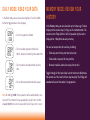
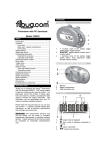
In the Daily mode, you can view several options. Press the middle
button to toggle between these displays.
I208
I238
I208
00I3
I78
00 58
20I
60I
• Current step count and clock
• Current aerobic step count (more than
10 min. of constant activity) and aerobic time
MEMORY MODE: REVIEW YOUR
HISTORY
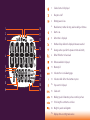
In the Memory mode, you can view data up to 14 days ago. To view
displays for the various days (1-14), press the bottom button. The
number next to “Day(s) Before” will tell you what day the data is
displayed for. 1 Day Before means yesterday.
You can review your data for each day, including:
• Total step count for day and total active time
• Total aerobic step count for day and time
• Current calories burned and total exercise
time
• Current distance walked and active speed
Note: At midnight 00:00, the step counter will be automatically reset
to zero. If the number of steps you walked is greater than the limit
allowed (99,999), the current values will flash until your unit is reset.
• Distance travelled, calories burned per km or mile
Toggle through all 14 of your daily records to return to Daily mode.
You cannot reset the records for one day manually. The Fitbug will
automatically reset them when it is appropriate.