1
SWR-COM
User Manual
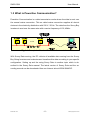
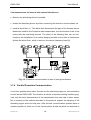
• connect the Sunny Boy Inverters and the SWR-COM to the same phase
(if this is absolutely not possible a phase coupler must most likely be installed, see
chap. 3.)
• keep the transmission line as short as possible.
• make sure that there are as few as possible (best none at all) disturbing electric
devices in your grid. These can be neon tube lamps, some microwave ovens and
sometimes large electric motors or similar.
• avoid the parallel usage of other devices that use the electricity grid for their
transmission such as Babyphone or Interphone devices.
If you stick to (most of) the above given rules there should normally be no problem
for the Powerline Communication - if there are problems with the data transmission
and the detection of the Sunny Boy Inverters see chap. 3 „Troubleshooting“.
2.3 Installing the SWR-COM
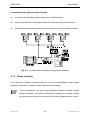
The installation of the SWR-COM is done in two steps: First the installation of the
SWR-COM Powerline modem to the grid and the PC, second the installation of
Sunny Data, the detection of the according Sunny Boy inverters and the configuration according to your specific requirements.
For the Sunny Data installation and its usage please refer to the „Sunny Data User
Manual“ - for connecting the SWR-COM do the following:
• write down the serial numbers of the Sunny Boy inverters you want to monitor
• plug the SWR-COM in the socket
• connect the cable from the SWR-COM to a free serial port of the PC (and write
down the port COM1 or COM2 if you can’t remember)
SWRCOM-11:EE
-8-
SMA Regelsysteme GmbH