1
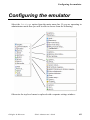
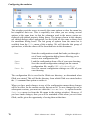
Configuring the emulator
Comments on call log
If you turn this option on then you will be asked for a comment that will be
added to the telephone log every time you log out from the system you were
logged into. (If you don't want to add a comment then just press ENTER when
asked).
Constant speed modem
When you use the dial function, the program will change the speed on the communications port to whatever speed is reported by your modem. If you wish to
run your modem at constant speed (in other words, use speed conversion
between the PC and the modem) this option will tell the program not to switch
the speed on the line.
Dial directory locking
This option, when turned on, will tell the dial directory to ask for your password
every time you use the dial directory and not just the first time you use it. If the
password has been disabled or you have just not specified a password, this
option will, of course, have no effect.
Password disable
This option may be used to disable any password you may have set in your dial
directory. This should only be used if you do not remember your password, as
disabling the password will mean that you will lose any passwords you may have
set for your host machines in the dial directory (this is for your own protection).
You may set and change the password for the dial directory using the
User/Password menu option inside the dial directory; you may also specify
your password as part of the command line using the /V switch.
196
Glink: Administrator’s Guide
Gallagher & Robertson