1
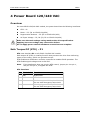
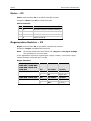
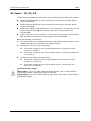
CDHD
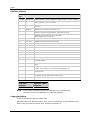
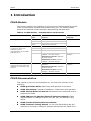
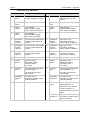
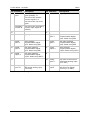
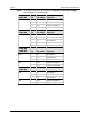
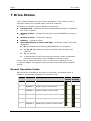
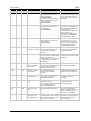
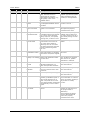
Drive Status
Display Light
Type
Name
Description
Action Required
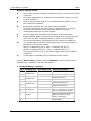
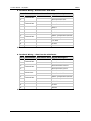
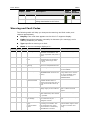
H
Flash
Fault
Motor OverTemperature
Either the motor has
overheated, or the drive is not
set up correctly for the motor
temperature sensor.
Check that the drive is
configured properly (using
THERMODE, THERMTYPE,
THERMTHRESH and
THERMTIME), and that the
motor temperature sensor is
properly connected to the
drive if needed.
If the drive is configured and
wired properly, check whether
the motor is under-sized for
the application.
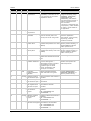
H
Steady Warning Motor OverTemperature
J
Flash
Motor is overheated.
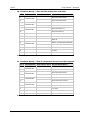
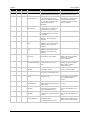
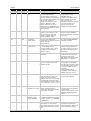
Fault
Velocity Over-Speed Actual velocity exceeded 1.2
Exceeded
times the velocity limit. The
velocity limit is set using VLIM.
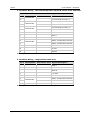
J1
Fault
Change drive tuning to
Exceeded Maximum The position error (PE) has
Position Error
exceeded the position error limit improve position tracking, or
increase PEMAX to allow a
(PEMAX)
greater position error.
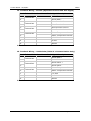
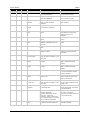
J2
Fault
Change drive tuning to
Exceeded Maximum The velocity error (VE) has
Velocity Error
exceeded the velocity error limit improve velocity tracking, or
increase VEMAX to allow a
(VEMAX)
greater velocity error.
J3
Fault
Excessive PE Value
Check tuning.
The position error (PE) has
reached the software numerical
limit.
J4
Fault
Motor Runaway
Condition Detected
The motor moves in negative
direction although the
commanded current is positive.
Commutation is incorrect.
(Algebraic signs of actual
current, acceleration and
velocity do not match.)
Correct MPHASE setting.
Activate and improve the
phase find process.
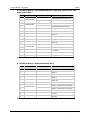
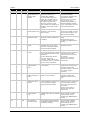
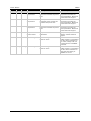
J5
Fault
Secondary
Feedback Position
Mismatch
Position deviation between
motor and load is too great.
Increase SFBPETHRESH,
SFBPETIME, SFBPEMAX, or
improve position tuning.
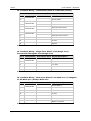
L1
Warning Hardware positive
limit switch is open
Positive hardware limit switch is
activated.
L2
Warning Hardware negative
limit switch is open
Negative hardware limit switch
is activated.
L3
Warning Hardware positive
and negative limit
switches are open
Positive and negative hardware
limit switches are both
activated.
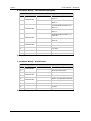
L4
Warning Software positive
limit switch is
tripped
Positive software limit switch is
activated.
PFB > POSLIMPOS and
POSLIMMODE = 1
L5
Warning Software negative
limit switch is
tripped
Negative software limit switch is
activated.
PFB < POSLIMNEG and
POSLIMMODE = 1
L6
Warning Software limit
Positive and negative software
switches are tripped limit switches are activated.
PFB > POSLIMPOS and
PFB < POSLIMNEG and
POSLIMMODE = 1
Quick Start Guide
Check that VLIM is set to
match the application
requirements. Using velocity
loop tuning, check for
excessive overshoot.
69