1
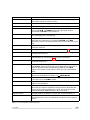
Package name
Description
Platform
Package options
xc3sprog, xilprg
Xilinx programming
tools
Xilinx FPGAs
Free, no support
package
uniproxy
GDB debug agent for
FPGA SoCs
Xilinx, Lattice FPGAs
SDK, HDL license,
support
bscan
Boundary scan tools
(automated hardware
tests) for ICEbear
Any, BSDL file required
SDK, support
bscan-flashload
Flash programmer for
various platforms via
Boundary Scan
SHARC, TigerSHARC,
ARM on request
Command line tool,
SDK, support
goJTAG
Graphical boundary
scan tool from
Testonica LTD,
Freeware
Any, BSDL file required
Free Software, support
bfemu-python
Blackfin specific
scripting for target
remote control and
system tests
Blackfin only
SDK, support
bscan-python
Python wrapper for
bscan
Any, BSDL required
SDK and
documentation
Table 1.2: Add-on custom packages
After finishing the installation, plug in the ICEbear to complete the driver installation. You can
safely ignore the Windows Certification warnings. Now you can start the programs from the
ICEbear program menu.
Note that your personal firewall (which might be active on your machine) must allow the port
2000 to be accessed locally. If you get a warning when starting gdbproxy, you can safely
unblock it.
For development of standalone or uClinux programs, you may also want to install the Blackfin
cross compiler toolchain for Windows. This can be found as a self installing executable in the
download area of the Blackfin GNU toolchain at http://blackfin.uclinux.org. For compiling the
uClinux kernel, a Linux development PC is required.
1.4.2
Linux
The ICEbear is known to run with the following configuration:
• Kernel 2.6.X or later
• libusb-0.1.7 or greater
Depending on your linux distribution, you will want to choose an installation method from the
sections below. The ICEbear software package contains some support files (examples, scripts)
that might be important for the user. See package description below about the location of
these files.
Debian / Ubuntu
It is assumed that you have a recent Debian installation like the following (tested):
1.4 Installing the software
v1.53
5