1
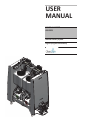
USER MANUAL: ALX-RDS - Remote Delivery System
READ ALL INSTRUCTIONS BEFORE OPERATING EQUIPMENT
WARNING
Avoid Personal Injury
1. Avoid contact of cleaning agent with skin and
eyes. If contact occurs, see MSDS sheet for
further first aid measures.
2. Follow safety instructions of chemical
manufacturer (MSDS).
3. Always follow plant and OSHA guidelines
about the use of hygiene equipment.
4. Disconnect power before servicing unit.
Specifications
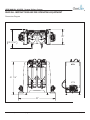
Frame..............1/2 HDPE Plastic
Width..............59”
Depth..............30”
Height.............51”
Water Connection Requirements
Cold Potable Water
35 PSI Minimum Pressure
60 PSI Maximum Pressure
5 GPM Connection
Electrical Connection Requirements
110 Volts AC
Single Phase
60 Hz
5 Amps
24 VDC - Control Voltage (Unit has internal power supply)
Acceptable Chemical Products
Acids
Caustics
Sanitizers
Chlorine
USER MANUAL (MODEL: ALX-RDS) Page 3 of 58
11/01/2014