1
User Manual
Menus, toolbars and screens
27
Transmission Event Log window
When the SmartLink Wireless software is started, the Transmission Event Log is displayed
maximized. Note the Transmission Event Log remains on the screen as long as the Server
is running. The log window may be resized or minimized but may not be closed.
The Transmission Event Log provides a detailed listing of 12-Lead transmissions received.
When the SmartLink Wireless software receives a valid transmission, it is added to the
Transmission Event Log. Depending on the options selected by the user, a sound may be
played on the PC running the SmartLink Wireless software and an email, text message
and/or page may be sent out automatically by the Server to designated personnel
notifying them of a new transmission.
After the transmission is added to the Transmission Event Log, all currently known data
about the transmission (such as transmission number, sender name, status of the
transmission, current progress, elapsed time of the given transmission, and the date and
time the transmission was accepted) are added to the log entry.
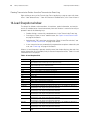
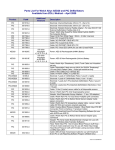
Table 1: Transmission Event Log fields
Column
Trns #
Viewed?/First Viewed
Sender
Status
Progress
Transfer Time
Recv Date
Recv Time
Group
Acq Date
Acq Time
12-Lead ID
Patient ID
Patient Name
Unit ID/Phone #
Dept
Description
Transmission number. A sequential index in time that the transmission was received relative to
all transmissions currently existing in the Transmission Event Log. This field is for reference
purposes only. If a transmission is deleted from the Log, the transmissions following the
deleted transmission are updated -- each transmission number is decremented by one.
Whether the given 12-Lead has been opened/viewed. When a transmission is accepted, the
field displays “No.” After the transmission is successfully completed and the Transmission is
opened for the first time the entry for this field is changed from “No” to “Yes – date / time,”
indicating the date and time the 12-Lead data was first opened for viewing. Note that only
successful, “Complete” 12-Lead transmissions may be viewed. Failed and cancelled
transmissions will always display “No.”
Name from the Sender List dialog. See “Sender List” on page 23 for more details.
Indicates the status of a given transmission. Possible values are as follows:
• Complete: The transmission was completed successfully.
• Failed: The transmission failed prematurely (due to factors such as excessive network
traffic, timing out, a dropped connection, etc.)
• Re-transmitting: The transmission is not yet complete and the SmartLink Wireless
software is attempting to request retransmission of needed data.
• Sender Cancelled: The sender explicitly cancelled the transmission via the Welch Allyn
PIC50 while the SmartLink Wireless software was waiting for the original transmission to
complete.
Note that only “Complete” 12-Lead transmissions can be opened and viewed. Also, if a
transmission fails or the sender cancels, the Hospital, Acq Date, Acq Time, Patient ID, Patient
Name, Unit ID, and Dept fields will remain blank because the transmission data is incomplete.
Progress of a given transmission in terms of percentage complete.
Elapsed time for a given transmission. When a 12-Lead transmission is accepted, the Transfer
Time column for the log entry begins at “00:00” and increases as data is transferred. When the
transmission is complete, the counter for the given transmission is stopped, and the transfer
time displayed reflects the amount of time the transmission took from start to finish.
Date a given transmission was accepted by the SmartLink Wireless software.
Time a given transmission was accepted by the SmartLink Wireless software.
The group name/ID selected from the PIC50 device.
Date the patient was created by the Welch Allyn PIC50.
Time the patient was created by the Welch Allyn PIC50.
Unique identifier of the transmission.
ID of the patient associated with the 12-Lead data.
Name of the patient associated with the 12-Lead data.
Unit ID of the Welch Allyn PIC50 used to acquire the 12-Lead data. This may also be entered as
the phone number of the emergency personnel that acquired the 12-lead as a quick reference
for the hospital personnel.
Department assigned to the Welch Allyn PIC50 used to acquire the 12-Lead data.