1
4.2
Group MMSI number
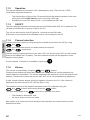
If your radio is configured as member of a group(s) it will receive group calls to that group.
The VHF can be configured to be part of (up to 10) groups. The group MMSI numbers can
be programmed from menu 4.5.2.
The configured group numbers are shown as a list. You can add a group MMSI number by
selecting the <empty> list entry and press
. Enter a valid group MMSI and press
A group number can be changed by selecting the number
, edit the number and press
OK. A group number can be removed from the list by selecting the number, press
delete the number and press
4.3
,
.
Differentiating incoming calls by ringing
tones
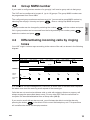
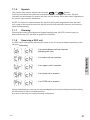
Your VHF rings in various ways according to the nature of the call, as shown in the following
diagram:
TONE SIGNAL
5 sec.
DISTRESS
TRANSMIT
3 sec.
Tx
3 1/2 - 4 1/2 min
3 sec.
3 1/2 - 4 1/2 min
Tx
3 sec.
Tx
3 1/2 - 4 1/2 min
3 sec.
Tx
60 sec.
DISTRESS &
URGENCY
SAFETY
CALLS
1 sec.
8 sec.
ROUTINE &
PSTN
39717
If an individual call acknowledgement is received, an alarm tone is activated that is equal to
the alarm tone used for receiving a call request of the same type.
Calls that are not received as distress calls or calls with category distress or urgency will
always engage the prescribed alarm sound. For any other DSC calls the call sound on
reception can be enabled/disabled from a Setup menu (4.3.2).
If you receive a call with an alarm sound, you will always be able to mute the alarm by
pressing the button
to be able to finish current radiotelephony call. This procedure
will not affect the actual call accept procedure.
0544
15
Detail
.