1
Before we Begin
Commands
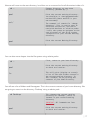
All commands in the following guide are highlighted inside grey boxes with the command as it
should be typed in the left and the description on the right. All commands are case sensitive and are
dependent on having the correct number of spaces / characters. Please be sure to copy it exactly.
ping -c 5 -n 10.203.1.5
Ping the IP Address 10.203.1.5
for a count of 5 (-c 5), outputting
numerical values only (-n)
Special Characters
Be aware of special characters and don’t get them confused with standard letters.
| = this is the Pipe character, used to pipe output from one command into another.
To type Pipe, use Shift + \ (located on the left side of the keyboard, next to the shift key)
Example Command: man -k directory | grep ls
Usernames
Throughout this document, the username ‘msai135’ is refered to as a sample account. When you are
working through this document, you should use your username in place of ‘msai135’.
Beyond this Workbook
There is more included in this worksheet than you can accomplish in the session time allotted. This is
so you can continue your study of Linux outside of the session, using this workbook as your starting
point. Even if you do not have access to a Linux environment to work with, you should still be able to
read through and gain knowledge and understanding from the examples in this workbook.
2|