1
500 Series Quickstart Guide
Software Guide
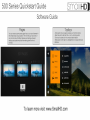
Pages
You can create custom preset pages that you can scroll between in
the simple swipe of your joystick. Think of it like you have a line of
rack monitors all with different features and settings activated,
swiping your joystick would be like walking down the line of
monitors.
Toolbox
-Click joystick on any page to access your monitors toolbox. -Select new tool to add with the + icon by clicking joystick
-Once tool is added click it to enable; disable feature
-Slide joystick to the right on a highlighted tool to adjust that tools
attributes.
To learn more visit: www.SmallHD.com