1
Table of contents
1. Presentation – Getting started ................................................................ 1
1.1. Install and connect SCOOP 5 IP................................................................................. 3
1.2. Audio settings ........................................................................................................... 3
1.3. Select and set up network to be used........................................................................... 3
2. Functions ............................................................................................ 5
2.1. Transmission interfaces .............................................................................................. 6
2.2. Audio encoding and decoding ................................................................................... 9
2.3. Audio interfaces ...................................................................................................... 12
2.4. Auxiliary functions ................................................................................................... 13
2.5. Supervision and control interface .............................................................................. 15
3. Operation .......................................................................................... 17
3.1. General principles – Control means .......................................................................... 17
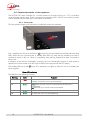
3.2. Physical description of the equipment ........................................................................ 18
3.3. Installation and set up ............................................................................................. 22
3.4. Initial setup of the Ethernet interface .......................................................................... 24
3.5. Managing links ....................................................................................................... 27
3.6. First level maintenance ............................................................................................ 31
4. Detailed operating mode – Embedded HTML pages ................................. 34
4.1. Equipment start-up .................................................................................................. 34
4.2. Accessing the SCOOP 5 IP html pages...................................................................... 35
4.3. Principles of operation with html pages ...................................................................... 36
4.4. Detailed presentation of the html pages ..................................................................... 37
4.5. Setting up an IP link ................................................................................................ 54
4.6. Setting up a link over a leased line ............................................................................ 57
4.7. Management of the configuration profiles .................................................................. 58
4.8. Clearing all settings ................................................................................................ 58
5. Technical characteristics ..................................................................... 59
5.1. Characteristics of interfaces...................................................................................... 59
5.2. Audio performance ................................................................................................. 67
5.3. Network protocols and ports .................................................................................... 69
5.4. Power supply .......................................................................................................... 70
5.5. Dimensions and weight............................................................................................ 70
5.6. Environmental characteristics.................................................................................... 70
5.7. Options ................................................................................................................. 70
5.8. Accessories and related products .............................................................................. 70
6. Annexes ............................................................................................ 71
6.1. Additional information on the algorithms and protocols used ....................................... 71
6.2. Overview of the SIP protocol .................................................................................... 72
SCOOP 5 IP - User Manual