1
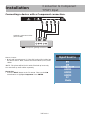
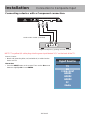
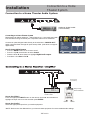
Connection to Component YPbPr Input Installation Connecting a device with a Component connection. Optional Component cables (not included) R L Y Pb Pr Digital set top box, gaming console or DVD How to Connect • Match and insert the green (Y), blue (Pb), and red (Pr) cables into the device and TV. Next, connect the red and white (L & R) audio cables. *NOTE: The picture will be black & white if hooked up incorrectly. You must hook up audio cables separately. How to Use • Press the INPUT button on the TV remote. Then use the arrow buttons to highlight Component. Press ENTER. 32E700 -14 Input Source HDMI1 HDMI2 HDMI3 PC Media