1
Product Description
Left Side
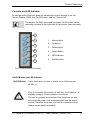
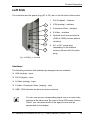
The interfaces and the power plug (AC or DC) are on the left side of the monitor.
1
1
DVI-D (digital) - interface
2
VGA (analog) - interface
3
Composite-Video - interface
4
S-Video - interface
5
Optional touch screen terminal
(USB or COM2) (shown without
interface)
6
AC- or DC- power-plug
(depending on the ordered
version) (shown with AC power
plug)
2
3
4
5
6
Fig. 4: KFM15_e - left side
Interfaces
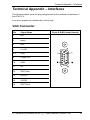
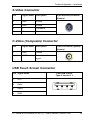
The following interfaces with standard pin assignments are available:
❏ VGA (analog) - input
❏ DVI-D (digital) - input
❏ S-Video (analog) - input
❏ C-Video -Composite Video- (analog) - input
❏ USB / COM interface as the touch screen terminal
You can connect one corresponding signal source to each video
interface at the same time. By means of the OSD-menu function
“Select” you can select which of the signal source shall be
represented on the display.
15" Industrial LCD Monitor KFM15_e – User’s Manual (Version 2.20)
15