1
Connecting the Remote Control Machine
6.1.1
Connecting via RS-232
To connect a device1 to the Remote Control unit, using the Null-modem
adapter provided with the machine (recommended):
Connect the RS-232 9-pin D-sub rear panel port on your RC-160 unit to a
9-wire flat cable
Connect the 9-wire flat cable to the Null-modem adapter
Connect the Null-modem adapter to the RS-232 9-pin D-sub port on the
device1
To connect a device1 to the RC-160 unit, without using a Null-modem adapter:
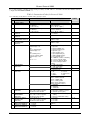
Connect the RS-232 9-pin D-sub port on your device to the RS-232 9-pin
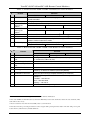
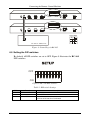
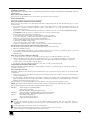
D-sub rear panel port on the Master RC-160 unit, as Figure 5 illustrates
PIN 5 Connected to PIN 5 (Ground)
PIN 3 Connected to PIN 2
PIN 2 Connected to PIN 3
9-pin D-sub
(From PC)
9-pin D-sub
(Male)
PIN 4 is connected to PIN 6
PINs 8, 7, 1 are connected together
If a shielded cable is used, connect the shield to PIN 5
Figure 5: Connecting a Device without using a Null-modem Adapter
6.2 Controlling via ETHERNET
You can connect the RC-160 via the Ethernet, using a crossover cable (see
section 6.2.1) for direct connection to the PC or a straight through cable (see
section 6.2.2) for connection via a network hub or network router.
6.2.1
Connecting the ETHERNET Port directly to a PC (Crossover Cable)
You can connect the Ethernet port of the RC-160 to the Ethernet port on your
PC, via a crossover cable with RJ-45 connectors.
This type of connection is recommended for identification of the factory default
IP Address of the RC-160 during the initial configuration
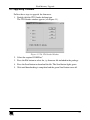
After connecting the Ethernet port, configure your PC as follows:
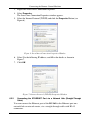
1. Right-click the My Network Places icon on your desktop.
2. Select Properties.
1 A PC, an additional remote control, or a switcher
13