1
Contents
Contents
1
2
2.1
3
3.1
4
5
6
6.1
Introduction
Getting Started
Quick Start
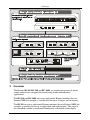
Overview
Terminology Used in this User Manual
Your RC-80, RC-160 and RC-160L Remote Control Machines
Installing in a Rack
Connecting the Remote Control Machine
Connecting the Remote Control Rear Panel
1
1
1
2
4
4
9
10
11
6.1.1
Connecting via RS-232
13
6.2
Controlling via ETHERNET
13
6.2.1
6.2.2
Connecting the ETHERNET Port directly to a PC (Crossover Cable)
Connecting the ETHERNET Port via a Network Hub (Straight-Through Cable)
13
14
6.3
6.4
6.5
7
7.1
Configuring the Ethernet Port
Controlling via RS-485
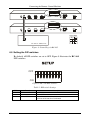
Setting the DIP-switches
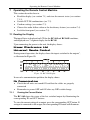
Operating the Remote Control Machine
Reading the Display
15
15
16
18
18
7.1.1
Viewing the Current Status
18
7.2
7.3
Switching OUT-IN Combinations
Confirming Settings
19
20
7.3.1
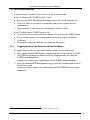
Toggling between the At Once and Confirm Modes
20
7.4
Choosing the Audio-Follow-Video or Breakaway Option
21
7.4.1
7.4.2
Setting the Audio-Follow-Video Option
Setting the Breakaway Option
21
21
7.5
8
8.1
8.2
8.3
9
10
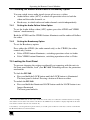
Locking the Front Panel
Flash Memory Upgrade
Downloading from the Internet
Connecting the PC to the RS-232 IN Port
Upgrading Firmware
Technical Specifications
Kramer Protocol 2000
21
22
22
22
23
24
25
i