1
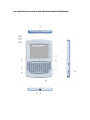
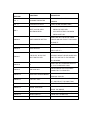
is trying to build connection with other Bluetooth device. If you see LED2 flash one time and then go out, this is normal, you can push Bluetooth Reset Button indicated by arrow16 to re-build connection. Click “Start”, “Control Panel” (make sure you’re in Classic View), and then double-click Bluetooth Devices. Click “Add”. In the Add Bluetooth Device Wizard, select the “My device is set up and ready to be found check box”, and then click “Next”. After icon of “Bluetooth iPazzPort” appear, click “Bluetooth iPazzPort”, and then click “Next”. When the wizard asks you which passkey you want to use, click “Choose a passkey for me”. Then click “Next”. After you are prompted to enter your passkey, please type the passkey on Bluetooth Handheld Keyboard, and then press Enter. You also can choose no passkey to go to next step. (Important: When you are prompted to type a passkey, you must do so and press Enter within 30 seconds) In the final page of the wizard, click Finish, and then click OK. Bluetooth Handheld Keyboard should now be successfully paired with your PC and ready to use. LED2 will goes out when connection is established successfully z Arrow 7 points to the Input Switch Key (SF Key) - When this key is pressed LED 3 will light up. This LED will stay on until this key is pressed again. That means while this light is on any key you press will use its secondary input rather than its primary input. For example the key Q is normally “Q” or “q”, but when you press the SF key it becomes the number “~”. When you have selected the Input Switch Key LED 3 will light up with a steady on. When you are in normal mode LED3 will be turned off. z Switch between upper-case and lower-case input mode - If you are in lower-case input mode, press key (CAP). This way you can turn to upper-case input mode, LED 3 will flash slowly, In order to return to lower-case input mode press the key again after you completed your upper-case input, the LED 3 goes out. z Recharge your Bluetooth Handheld Keyboard - Bluetooth Handheld Keyboard is equipped with a rechargeable battery and USB cable, plug mini USB into mini USB jack on the Bluetooth Handheld Keyboard and another end to your PC USB port, it means