1
Getting Started with ADOL-C
2
3
Preparing a Code Segment for Differentiation
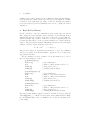
The modifications required for the algorithmic differentiation with ADOL-C
form a five step procedure:
1. Include needed header-files
For basic ADOL-C applications the easiest way is to put
#include “adolc.h”
at the beginning of the file.
The exploitation of sparsity and the parallel computation of derivatives require additional header files.
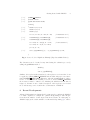
2. Define the region that has to be differentiated
That is, mark the active section with the two commands:
trace on(tag,keep); Start of
...
active section
trace off(file);
and its end
These two statements define the part of the program for which an internal
representation is created
3. Declare all independent variables and dependent variables of type adouble
and mark them in the active section:
xa ≪= xp; mark and initialize independents
...
calculations
ya ≫= yp; mark dependents
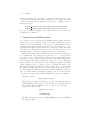
4. Declare all active variables, i.e., all variables on the way from the independent
variables to the dependent variables of type adouble
5. Calculate derivative objects after trace off(file)
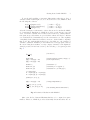
Before a small example is discussed, some additional comments will be given.
The optional integer argument keep of trace on as it occurs in step 2 determines
whether the numerical values of all active variables are recorded in a buffered
temporary file before they will be overwritten. This option takes effect if keep = 1
and prepares the scene for an immediately following reverse mode differentiation
as described in more detail in the sections 4 and 5 of the ADOL-C manual. By
setting the optional integer argument file of trace off to 1, the user may force
a tape file to be written on disc even if it could be kept in main memory. If
the argument file is omitted, it defaults to 0, so that the tape array is written
onto an external file only if the length of any of the buffers exceeds BUFSIZE
elements, where BUFSIZE is a user-defined size.
ADOL-C overloads the two rarely used binary shift operators ≪= and ≫=
to identify independent variables and dependent variables, respectively, as described in step 3. For the independent variables the value of the right hand side
is used as the initial value of the independent variable on the left hand side.
Choosing the set of variables that has to be declared of the augmented data
type in step 4 is basically up to the user. A simple strategy that can be applied