1
2
CWEB USER MANUAL (VERSION 3.0)
typeset in TEX with virtually no knowledge of that language. To someone familiar with both C and TEX the
amount of effort necessary to learn the commands of CWEB is small.
Overview
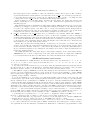
Two kinds of material go into CWEB files: TEX text and C text. A programmer writing in CWEB should be
thinking both of the documentation and of the C program being created; i.e., the programmer should be
instinctively aware of the different actions that CWEAVE and CTANGLE will perform on the CWEB file. TEX text
is essentially copied without change by CWEAVE, and it is entirely deleted by CTANGLE; the TEX text is “pure
documentation.” C text, on the other hand, is formatted by CWEAVE and it is shuffled around by CTANGLE,
according to rules that will become clear later. For now the important point to keep in mind is that there are
two kinds of text. Writing CWEB programs is something like writing TEX documents, but with an additional
“C mode” that is added to TEX’s horizontal mode, vertical mode, and math mode.
A CWEB file is built up from units called sections that are more or less self-contained. Each section has
three parts:
• A TEX part, containing explanatory material about what is going on in the section.
• A middle part, containing macro definitions that serve as abbreviations for C constructions that would be
less comprehensible if written out in full each time. They are turned by CTANGLE into preprocessor
macro definitions.
• A C part, containing a piece of the program that CTANGLE will produce. This C code should ideally be
about a dozen lines long, so that it is easily comprehensible as a unit and so that its structure is
readily perceived.
The three parts of each section must appear in this order; i.e., the TEX commentary must come first, then
the middle part, and finally the C code. Any of the parts may be empty.
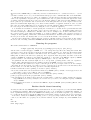
A section begins with either of the symbols ‘@ ’ or ‘@*’, where ‘ ’ denotes a blank space. A section ends
at the beginning of the next section (i.e., at the next ‘@ ’ or ‘@*’), or at the end of the file, whichever comes
first. The CWEB file may also contain material that is not part of any section at all, namely the text (if any)
that occurs before the first section. Such text is said to be “in limbo”; it is ignored by CTANGLE and copied
essentially verbatim by CWEAVE, so its function is to provide any additional formatting instructions that may
be desired in the TEX output. Indeed, it is customary to begin a CWEB file with TEX code in limbo that loads
special fonts, defines special macros, changes the page sizes, and/or produces a title page.
Sections are numbered consecutively, starting with 1. These numbers appear at the beginning of each section of the TEX documentation output by CWEAVE, and they appear as bracketed comments at the beginning
and end of the code generated by that section in the C program output by CTANGLE.
Section Names
Fortunately, you never mention these numbers yourself when you are writing in CWEB. You just say ‘@ ’
or ‘@*’ at the beginning of each new section, and the numbers are supplied automatically by CWEAVE and
CTANGLE. As far as you are concerned, a section has a name instead of a number; its name is specified by
writing ‘@<’ followed by TEX text followed by ‘@>’. When CWEAVE outputs a section name, it replaces the ‘@<’
and ‘@>’ by angle brackets and inserts the section number in small type. Thus, when you read the output of
CWEAVE it is easy to locate any section that is referred to in another section.
For expository purposes, a section name should be a good description of the contents of that section; i.e.,
it should stand for the abstraction represented by the section. Then the section can be “plugged into” one or
more other sections in such a way that unimportant details of its inner workings are suppressed. A section
name therefore ought to be long enough to convey the necessary meaning.
Unfortunately, it is laborious to type such long names over and over again, and it is also difficult to specify
a long name twice in exactly the same way so that CWEAVE and CTANGLE will be able to match the names to
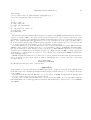
the sections. To ameliorate this situation, CWEAVE and CTANGLE let you abbreviate a section name, so long
as the full name appears somewhere in the CWEB file; you can type simply ‘@<α...@>’, where α is any string
that is a prefix of exactly one section name appearing in the file. For example, ‘@<Clear the arrays@>’ can
be abbreviated to ‘@<Clear...@>’ if no other section name begins with the five letters ‘Clear’. Elsewhere
you might use the abbreviation ‘@<Clear t...@>’, and so on.
Section names must otherwise match character for character, except that consecutive characters of white
space (spaces, tab marks, newlines, and/or form feeds) are treated as equivalent to a single space, and such