1
CWEB USER MANUAL (VERSION 3.0)
7
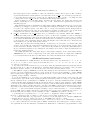
The next several control codes introduce “control texts”, which end with the next ‘@>’. The closing ‘@>’
must be on the same line of the CWEB file as the line where the control text began. The context from each
of these control codes to the matching @> is restricted.
@^ [T M Cc] ∗ The control text that follows, up to the next ‘@>’, will be entered into the index together with
the identifiers of the C program; this text will appear in roman type. For example, to put the phrase
“system dependencies” into the index that is output by CWEAVE, type ‘@^system dependencies@>’ in
each section that you want to index as system dependent.
@. [T M Cc] ∗ The control text that follows will be entered into the index in typewriter type.
@: [T M Cc] ∗ The control text that follows will be entered into the index in a format controlled by the
TEX macro ‘\9’, which you should define as desired.
@t [M Cc] ∗ The control text that follows will be put into a TEX \hbox and formatted along with the
neighboring C program. This text is ignored by CTANGLE, but it can be used for various purposes within
CWEAVE. For example, you can make comments that mix C and classical mathematics, as in ‘size < 215 ’,
by typing ‘|size < @t$2^{15}$@>|’.
@= [M Cc] ∗ The control text that follows will be passed verbatim to the C program.
@q [LT M Cc] ∗ The control text that follows will be totally ignored—it’s a comment for readers of the
CWEB file only. A file intended to be included in limbo, with @i, can identify itself with @q comments.
Another use is to balance unbalanced parentheses in C strings, so that your text editor’s parenthesis
matcher doesn’t go into a tailspin.
@! [T M Cc] ∗ The section number in an index entry will be underlined if ‘@!’ immediately precedes the
identifier or control text being indexed. This convention is used to distinguish the sections where an
identifier is defined, or where it is explained in some special way, from the sections where it is used.
A reserved word or an identifier of length one will not be indexed except for underlined entries. An ‘@!’
is implicitly inserted by CWEAVE when an identifier is being defined or declared in C code; for example,
the definition
int array [max dim ], count = old count ;
makes the names array and count get an underlined entry in the index. Statement labels, function
definitions like main (argc , argv ), and typedef definitions also imply underlining. A traditional-style
function definition (without prototyping) doesn’t define its arguments; the arguments will, however, be
defined (i.e., their index entries will be underlined) if their types are declared before the body of the
function in the usual way (e.g., ‘int argc ; char ∗∗argv ; { . . . }’).
We now turn to control codes that affect only the operation of CTANGLE.
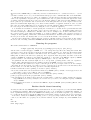
@’ [M Cc] This control code is dangerous because it has quite different meanings in CWEB and the original
WEB. In CWEB it produces the decimal constant corresponding to the ASCII code for a string of length 1
(e.g., @’a’ is CTANGLEd into 97 and @’\t’ into 9). You might want to use this if you need to work in
ASCII on a non-ASCII machine; but in most cases the C conventions of <ctype.h> are adequate for
character-set-independent programming.
@& [M Cc] The @& operation causes whatever is on its left to be adjacent to whatever is on its right, in the
C output. No spaces or line breaks will separate these two items.
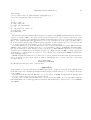
@l [L] CWEB programmers have the option of using any 8-bit character code from the often-forbidden range
128–255 within TEX text; such characters are also permitted in strings and even in identifiers of the C
program. Under various extensions of the basic ASCII standard, the higher 8-bit codes correspond to
accented letters, letters from non-Latin alphabets, and so on. When such characters occur in identifiers,
CTANGLE must replace them by standard ASCII alphanumeric characters or _, in order to generate
legal C code. It does this by means of a transliteration table, which by default associates the string
Xab to the character with ASCII code # ab (where a and b are hexadecimal digits, and a ≥ 8). By
placing the construction @l ab newstring in limbo, you are telling CTANGLE to replace this character
by newstring instead. For example, the ISO Latin-1 code for the letter ‘ü’ is # FC (or ’\374’), and
CTANGLE will normally change this code to the three-character sequence XFC if it appears in an identifier.
If you say @l fc ue, the code will be transliterated into ue instead.
CWEAVE passes 8-bit characters straight through to TEX without transliteration; therefore TEX must
be prepared to receive them. If you are formatting all your nonstandard identifiers as “custom” control