1
Easy Install
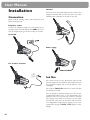
Handset
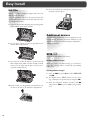
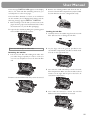
3 Close the paper feed flap.
Insert one end of the spiral cable into the socket of the
telephone handset and the other end into the socket
identified with a handset on the side of the unit.
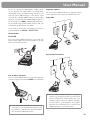
Power supply
Loading paper
1 Insert the paper tray in the slots provided behind
the paper feed mechanism.
Starting up
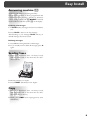
To finish the installation process you have to go
through some main settings (e.g. adaption of your fax
to the telephone line). Using EASY INSTALL your
fax machine will be configured according to your local
conditions.
1 Press HELP/w for at least two seconds. Your fax
machine will print one page. Follow the instructions on it.
2 Pull the paper feed flap fully forward until it stops.
Insert several sheets of A4 paper (80 g/m2) up to
the end-stop in the paper feed mechanism (max. 50
sheets).
2 Your fax machine will then guide you on the display
through the first settings, such as your telephone
number and your name.
3 After that it will prompt you to enter the current
time and date. Use the dial pad to enter the correct
time (e.g. 09 15 for 9:15).
4 Enter the correct day, month and year (e.g. 15
05 05 for May 15th, 2005).
5 To conclude press OK
3