1
User Manual
Description of the machine
1 Mains cable with power plug
8 Printer roller
2 Document guide
9 Scanner lid
3 Paper feed flap
10 Holder for “Plug’N’Print” card
4 Paper tray
11 Front ink film compartment
5 Telephone handset
12 Rear ink film compartment
6 Document Feeder
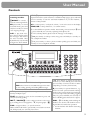
7 Operation panel
Display symbols *
f / F indicates whether you are sending or copying with a higher picture quality or with grey tones. If neither
of the two symbols is visible, the standard resolution is selected.
h appears when faxes are stored in memory.
áéíó indicates ink film consumption.
I appears when you receive another call while using the device or you receive a call in your absence (not available
in all countries).
W appears only if there are new SMS messages in the memory (for device with SMS functionality).
b shows that the built-in answering machine is switched on (for device with built-in answering machine).
$ faxes as well as phone calls are received completely silent.
S/M/U three symbols on the display indicate the current settings.
* two lines for device with SMS functionality
6