1
6.4.3. Day
Here you can set the day of the week:
• Monday
• Tuesday
• Wednesday
• Thursday
• Friday
• Saturday
• Sunday
Please note: You need to use the Down button
to move to the end of the list of weekdays.
6.4.8. Sub Floor
Here you can enter the type of sub floor:
• Concrete
• Screed
• WBP Ply
• Ins. Backer Board
• Backer Board
6.4.9. Application
Here you can select the type of regulator
application:
You can also get readouts of some statistics:
• Min daily: A percentage indicating the
minimum activated period within 24 hours
over the last 14 days.
• Max daily: A percentage indicating the
maximum activated period within 24 hours
over the last 14 days.
• 2 Days: Indicates how many % the heater
has been turned on for the last two days.
• Floor Temp. Cont.: A floor sensor is used.
6.4.4. Temperature
Scale
Here you can specify what temperature unit
should be used in the display:
• °C (Celsius, with a resolution of 0.5 degree)
• °F (Fahrenheit, with a resolution of 1
degree)
• A scale from 1-10 (in steps of about 10°).
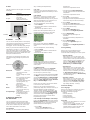
Display shows
Here you can decide whether the display shall
show the time, set point and/or air temperature.
• Time (On/Off)
• Set point (On/Off) (The current temperature
that the thermostat has been set to, for
instance in the 4-event settings.)
• Air Temp. (On/Off). The room/air
temperature currently registered by the
sensor.
Air temperature
Set point
Time
6.4.5. Child lock
By switching on the child lock you can lock the
menus (marked with a padlock symbol on the
display). Then it will no longer be possible to
select the sub-menus and change the settings.
You can still set a comfort temperature and the
time, though.
Please note: You can still use the Reset button
to return to factory settings, if the child lock has
been switched on.
6.4.6. Heater
Here you can define the type of heater that the
thermostat is attached to:
• Wire
• Ribbon
• Carbon
• Radiator
• Type A
• Type B
• Type C
• User Defined
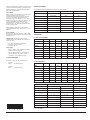
Please refer to Appendix for configuration table
showing combinations of heater type and
covering.
6.4.7. Covering
Here you can enter the type of floor covering:
• Ceramic Tiles
• Stone
• Laminate
• Wood
• Carpet
• Vinyl
• Other
Please refer to Appendix for configuration table
showing combinations of heater type and
covering.
• Fl. Cont. 2 sensors: Both floor sensor and
limit sensor are used. A maximum
temperature limit can be set for the limit
sensor, so the thermostat will switch off if
the temperature at the place of the limit
sensor reaches the maximum temperature.
This set-up with a limit sensor can, for
instance, be used to avoid damage to some
delicate floor covering.
• Air Temp. Control: The sensor is placed in
the thermostat.
• Air Cont. Floor limit: Apart from the sensor
inside the thermostat an extra limit sensor
is used. A maximum temperature limit can
be set for the limit sensor, so the thermostat
will switch off if the temperature at the
position of the limit sensor reaches the
maximum temperature. This set-up with an
extra limit sensor can, for instance, be used
to avoid damage to some delicate floor
covering.
• Regulator Control: No sensor is used here.
The thermostat will turn on in sequences of
20 minutes, and you can specify the length
of the sequences as a percentage of 20
minutes. If you, for example, set the
regulator to 50, the thermostat will turn on
for 10 minutes, switch off for 10 minutes,
and then turn on again for 10 minutes.
• External Control: Used in case of a set-up
with several thermostats being controlled
by an external master thermostat. Then the
thermostat will work as a slave, and you
cannot apply any settings at all since the
master thermostat controls it.
6.5. Service
If you need tecnical help then select Service
from the main menu to see the contact
information.
6.6. Contact Details
Select Contact Details from the main menu to
see the contact information.
Warmup plc
www.warmup.com
GB +442084536868
USA +12037910072
ES +34800099988
PT +351800812080
F +33080563990
6.7. Engineer Settings
To select Engineer settings, press the up and
down button at the same time for 5 seconds.
Note: Changes may invalidate warranty.
6.7.1. Readout
Here you see readouts of the following current
temperatures:
• Room temp
• Floor temp
• Floor limit temp
• 30 Days: Indicates how many % the heater
has been turned on for the last 30 days.
• 360 Days: Indicates how many % the
heater has been turned on for the last 360
days.
• Min Air: Minimum room temperature within
the last 48 hours.
• Mean Air: Average room temperature
within the last 48 hours.
• Max Air: Maximum room temperature
within the last 48 hours.
• Min Floor: Minimum floor temperature
within the last 48 hours.
• Mean Floor: Average floor temperature
within the last 48 hours.
• Max Floor: Maximum floor temperature
within the last 48 hours.
• Cut out cnt: Number of relay connections
in the service life of the thermostat. This
value is never reset.
• Application: Here you can get readout for
the current application type that has been
selected in the General settings
- Floor
- Floor-2
- Air
- Air-Limit
- Reg.
- Ext.
• Software ver.: Indicates the current version
of the software.
6.7.2. Temp. Settings
Here you can specify the wanted minimum and
maximum temperatures for air, floor, or external
limit sensor.
Before you can select minimum and maximum
limits for air, floor or limit sensor, the application
for the regulator type in question must be
chosen. Please refer to section about General
Settings – Application on page 11 for more
details.
Please note: If you do not specify any settings
here, the factory settings will be used.
• Air Temp. Range
Max Temp
Min Temp
• Floor Temp. Range
Max Temp
Min Temp
• Limit Sensor
Max Temp
Min Temp
6.7.3. Adaptive function
Here you can activate/deactivate (On/Off) the
adaptive function. This function is only related
to the 4-event timer and only works in
connection with going from one event to
another where the temperature is going to be