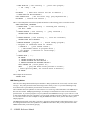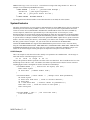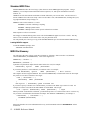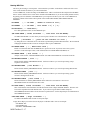
1
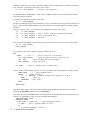
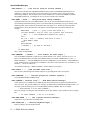
synthesizer would be 96. The velocity controls the loudness of the note and typically is a measure of how hard
a key was struck. Velocities can range from 0 to 127. Enter:
50 100 MIDI.NOTEON
( note=50, velocity=100 )
You should now hear a sustaining note. If not, check your MIDI connections, audio connections, and volume
levels and repeat the command.
Eventually you will want to turn this note off. Enter:
50 71 MIDI.NOTEOFF
You may be wondering why the OFF command has a velocity. This relates to how fast you "pull your finger off
the key", and is part of the MIDI standard. Only a few synthesizers can use this number, an example being the
Kawai K4.
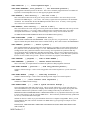
Now let's overlap two notes (if your synthesizer is monophonic, this won't work). Enter:
54
70 MIDI.NOTEON
59
110 MIDI.NOTEON ( hear 2 notes, 2nd one should be loudest)
54
0 MIDI.NOTEOFF ( first note turns off )
59
0 MIDI.NOTEOFF ( silence )
There is a handy command that will turn off the last note played without you having to type it in again. Enter:
62 90 MIDI.NOTEON
MIDI.LASTOFF
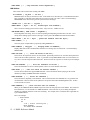
For convenience, let's make a word that will play a note then turn it off.
Enter:
: BANG
( note -- , play a note for 1/4 second )
100 MIDI.NOTEON
( play it with velocity value of 100 )
250 MSEC
( wait roughly 250 milliseconds )
MIDI.LASTOFF
( turn off note )
;
56 BANG
( test it, should play 1 short note )
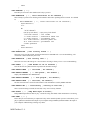
Now let's use this word in another program. Let's write a program to play a random note every quarter second.
: RAND.NOTES
( -- , play random notes )
BEGIN
( start looping )
96
36 WCHOOSE ( select random note between 96 and 36 )
BANG
( play it )
?TERMINAL
( key hit?)
UNTIL
;
RAND.NOTES
(Note: Refer to the chapter of this manual called "HMSL Utilities (Distribution Functions)" for a complete
description of WCHOOSE, and the related word CHOOSE).
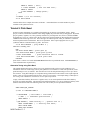
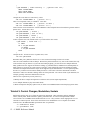
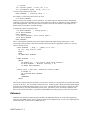
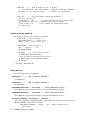
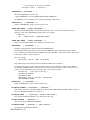
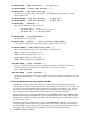
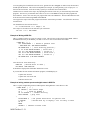
Let’s now write a word called MIDI.SCALE, which will produce an ascending scale using a different patch for
each note. Try editing this in a file so you can experiment with changing it.
ANEW TASK-MIDI_SCALE
VARIABLE TEMPO
: MIDI.SCALE ( start end -- , play ascending scale )
1+ SWAP
( put in proper order for DO )
DO
I 100 MIDI.NOTEON ( turn on )
13 - 2 HMSL Reference Manual