1
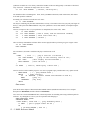
To avoid getting lots of undesired rests in the score, generate the notes as legato. In other words, the ON times
should equal the duration. This can be accomplished, for example, by setting the duty.cycle in a player to 1 1.
See PUT.DUTY.CYCLE:. In the Score Entry System you would enter the word LEGATO.
Another factor to consider is the tempo. By adjusting the real time clock rate, you can match tempi from other
programs. The best way to determine what values to use is to create MIDI File using the other program and
then examine it. Enter a few notes into your program then write out a MIDI File. Then use MF.CHECK to look
at the division in the header using HMSL's MF.CHECK.
Let's suppose the tempo in the other program is defined as 120.00 beats per minute. Let's define the division as
D in ticks/beat.
You should then set the real time clock to:
R = ticks/second = D * Tempo / 60
For a tempo of 120 and a D of 100 ticks/beat you would enter:
100 120 * 60 / RTC.RATE!
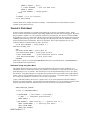
Example of Writing a MIDI File
Here is a sample sequence of events for writing to a file. This will write to the logical volume HMF: which is
the MidiFiles directory on the HMSL_User disk. Feel free to write to somewhere else on disk.
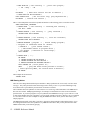
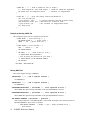
: MAKE.MF ( -- )
100 TICKS/BEAT ! \ define a quarter note
" HMF:TEST.MF" $MF.BEGIN.FORMAT0
MF-START-POS ! ( save starting position )
0 50 64 MF.WRITE.NOTEON ( write note )
100 50 0 MF.WRITE.NOTEOFF ( finish it )
200 55 80 MF.WRITE.NOTEON ( write note )
400 55 0 MF.WRITE.NOTEOFF ( finish it )
MF-START-POS @ MF.END.FORMAT0
;
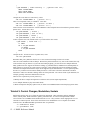
Now check it out. Enter interactively:
MAKE.MF ( should write to disk )
MF.CHECK HMF:TEST.MF
It should have displayed the file header and the note events.
If you read this file into commercial notation program, it should display as:
a quarter note at time 0
a quarter note rest at time 100
a half note at time 200
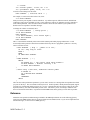
Example of writing random quarter and eighth notes in MIDI File
Here is a quick example that generates random quarter and eighth notes. Enter these in a file.
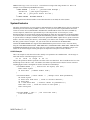
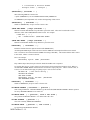
: RAND.NOTE ( -- )
12 CHOOSE \ one octave range
60 +
\ start at Middle C
50 30 CHOOSE + \ random velocity
MIDI.NOTEON \ play note
\
TICKS/BEAT @ \ use global definition of quarter note
2 CHOOSE
\ divide beat by 2 roughly 1 out of every 2 notes
IF 2/
THEN
VTIME+! \ advance virtual time
\
MIDI Toolbox 13 - 21