1
Important Reminders
These usage and safety guidelines are IMPORTANT! Please follow them carefully.
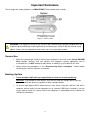
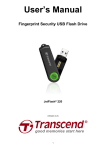
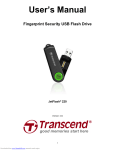
Figure 1. JetFlash 220
WARNING! The fingerprint sensor on the JetFlash 220 is delicate and should be handled with care
to prevent physical damage. Avoid squeezing or scratching your JetFlash 220 with hard or sharp
objects. Always close the protective cover when not in use or during transport.
General Use
•
Each time you plug the JetFlash 220 into your computer it will install a new Virtual CD-ROM
Drive labeled “JetFlash 220” that contains the fingerprint security application and its
associated files. Do NOT attempt to edit, delete, or modify any of the data on this disk.
•
Always follow the procedures in the “Disconnecting from a Computer” section before
removing your JetFlash 220 from a computer.
Backing Up Data
•
Transcend does NOT take any responsibility for data loss or damage during
operation. If you decide to store data on your JetFlash 220, we strongly advise that you
regularly backup the data to a computer or other storage medium.
•
To ensure High-Speed USB 2.0 data transfer rates when using your JetFlash 220 with a
computer, please make sure the computer has all relevant USB drivers installed. If you are
unsure how to check this, please consult the computer or motherboard User’s Manual for
USB driver information.
4