1
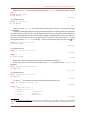
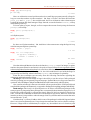
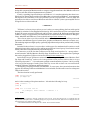
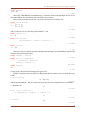
Alkiviadis G. Akritas 2. SAGE Sage was started by William Stein in 2004 but is now developed by a worldwide community of contributors; it is a free, open-source CAS which integrates many specialized mathematics software into a common interface, for which the user needs to know only the programming language Python. However, Sage is not pure Python, since it makes use of many external packages written in various other programming languages (C, C++, Fortran, Lisp, Python, etc); the list of these packages can be seen at http://www.sagemath.org/linkscomponents.html. Of interest to us is the fact that Sage comes bundled with four well established and time-tested CASs: Gap, Maxima, Pari/Gp and Singular as well as the Python-based SymPy.1 This results in two-fold benefits: instead of writing functions anew, Sage uses the existing functions of these CASs: Gap for Group Theory, Maxima for Calculus, Pari/Gp for Number Theory, Singular for Commutative Algebra; each one of these CASs can be used on its own; in this way, the user can verify the results obtained in one system by comparing them against the results obtained using another. Sage can be downlowded from http://www.sagemath.org/ and is available for Linux, MacOSX, Solaris and Windows; the author found that Debian is the easiest package distribution system to deal with. The user interface can be: a Sage notebook in a web browser, in which case Sage connects either locally to ones own Sage installation or to a Sage server on the network, a command line in a terminal, and TeXmacs, which is not mentioned neither in the Sage main web page nor in the Sage manuals/ tutorials. Inside the Sage notebook or inside TeXmacs one can create embedded graphics, typeset mathematical expressions, etc. In the sequel, Sage is demonstrated by: a) factoring the polynomial x2 9 in it, as well as in all the CASs that come bundled with it, and b) counting the number of prime numbers ≤ 100. TeXmacs is used as the interface and to start the whole process we initiate an interactive session with Sage with the help of the menu Insert → Session → Sage.2 After TeXmacs has been linked to Sage the following system information and Sage] prompt appear indicating we are ready to begin; note that the red color of the prompt is the only difference between the interface (original document) and the pdf file produced by LaTeX: | Sage Version 5.5, Release Date: 2012-12-22 | | Type ''notebook()'' for the browser-based notebook interface. | | Type ''help()'' for help. | Sage] To factor x2 9 in Sage itself we first define the polynomial ring [x]: Sage] R.<x> = ZZ['x'] and then enter the polynomial in the (already defined) variable x. Sage] poly = x^2 - 9 31 msec 60 msec 1At the site https://github.com/sympy/sympy/wiki/SymPy-vs. Sage a comparison can be found between Sage and SymPy. 2 It is assumed that Sage is installed on the computer and «visible» from a terminal window. 36 © ÊÎÌÏÜÞÒÅÐÍÛÅ ÈÍÑÒÐÓÌÅÍÒÛ Â ÎÁÐÀÇÎÂÀÍÈÈ. ¹ 6, 2012 ã.