1
QVidium™ TECHNOLOGIES, INC.
MPEG2+4 SDI IP Codec
Model #QVSDI-11-IP
User’s Manual v.6
March 24, 2008
Application Firmware Version 21
© 2007-2008 QVidium™ Technologies, Inc.
12989 Chaparral Ridge Road, San Diego, CA 92130
Phone 858.792.6407 • Fax 858.792.9131
User’s Manual v.6
QVidium™ MPEG2+4 SDI IP Codec
Table of Contents
1
Introduction.............................................................................................................3
1.1
Overview ...........................................................................................................3
1.2
Network Setup .................................................................................................3
1.3
Ping....................................................................................................................5
1.4
Passwords and Security .................................................................................6
1.5
Resetting to Default Settings .........................................................................6
1.6
Upgrading .........................................................................................................6
1.7
System View.....................................................................................................7
2 Encoder Configuration and Operation.............................................................9
2.1
Configuring the Encoder.................................................................................9
2.2
Starting the Encoder .......................................................................................9
2.3
Stopping and Reconfiguring the Encoder ....................................................9
2.4
Configuring Packet Transport & Error Correction .....................................10
3 Decoder Configuration and Operation...........................................................14
3.1
Decoding Profile and Web Interface ...........................................................14
3.2
Starting the Decoder .....................................................................................16
3.3
Stopping and Reconfiguring the Decoder ..................................................16
3.4
Configuring Packet Transport & Error Correction .....................................16
4 Codec Configuration and Operation ..............................................................19
5 Importing and Exporting Profiles....................................................................20
6 SNMP Traps ..........................................................................................................21
7 Resetting Flash Memory....................................................................................22
7.1
Resetting Flash Parameters ........................................................................22
7.2
Re-Initializing Flash Memory........................................................................23
8 System Management & Logging .....................................................................24
9 RS-232 Control over IP.......................................................................................26
10 Codec Manager ....................................................................................................27
11 Known Problems .................................................................................................28
12 Troubleshooting & Support ..............................................................................29
12.1 Troubleshooting – Common Problems.......................................................29
12.2 Support............................................................................................................31
13 Appendix ...............................................................................................................32
13.1 Appendix A: Encoder Configuration Parameters ......................................32
13.2 Appendix B: Decoder Configuration Parameters ......................................37
13.3 Appendix C: MPEG2+4 SDI Codec Bitrate Limits ....................................41
13.4 Appendix D: Technical Specifications ........................................................43
13.5 Appendix E: Product Warranty Terms and Conditions ............................45
2 of 45 - Copyright 2007-2008 QVidium™ Technologies, Inc.
User’s Manual v.6
1
QVidium™ MPEG2+4 SDI IP Codec
Introduction
Congratulations on purchasing the QVidium™ MPEG2+4 SDI IP Codec.
QVidium™ MPEG2+4 SDI IP Codec – Front View
1.1 Overview
The MPEG2+4 SDI IP Codec can be configured to encode or decode video using either MPEG-2
(main profile) or MPEG-4 (simple profile) compression and to interface with resulting video stream
over standard Ethernet/IP networks. With the QoS option, the MPEG2+4 SDI IP Codec includes
the latest industry-standard Pro-MPEG Forum Forward Error Correction (Code of Practice 3,
release 2), and also implements QVidium’s patent-pending advanced ARQ Error Correction and
Packet Pacing. With these advanced Quality of Service (QoS) features, the MPEG2+4 can send
video over nearly any network and across the world, including wireless connections and the public
Internet, with unsurpassed video transport quality.
1.2 Network Setup
The MPEG2+4 SDI IP Codec comes with a factory preset IP address of 192.168.1.100 and
Netmask of 255.255.255.0. You can download and run our CodecManager application to change
the IP settings, even when the IP address has been reset to an unknown address. Please refer to
section 8 of this manual for configuration using the CodecManager application.
The MPEG2+4 Codec can also be reconfigured through a web browser when you know the IP
address. Follow the steps below to reconfigure the network settings through a web browser on a
computer connected to the same subnet as the Codec.
1) Point your web browser to http://192.168.1.100
NOTE: The MPEG2+4 SDI IP Codec requires user authentication to enter the web browser or to
log in using Telnet. The factory preset username is “root” and the password is also “root.”
Please enter these settings when prompted to access the system.
2) Click on “Configure” under the “Network” menu on the left.
3 of 45 - Copyright 2007-2008 QVidium™ Technologies, Inc.
User’s Manual v.6
QVidium™ MPEG2+4 SDI IP Codec
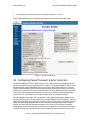
You should see a web page similar to the following network configuration web page:
3) Change settings as desired and click “Apply”.
4) If you change the IP address, you will need to change the URL in the web browser to point to
the new address after clicking on “Apply”.
The Network Configure panel allows you to modify the static IP address parameters and DNS
server settings, or to have these settings automatically configured through DHCP. A Hostname
panel allows you to specify the host name for use in conjunction with a DNS server to assign a
predetermined IP address.
Although a user with Linux experience can use Telnet to temporarily add routes or change
settings, please be aware that the MPEG2+4 SDI IP Codec uses a RAM file system and therefore
any changes made through Telnet to files in the standard file system will be lost when power is
cycled.
Note: In case you change the IP address or select DHCP or change the root password and you
forget or cannot determine the new IP address or root password, you can hit the reset button for
more than 2 seconds to reset the IP address to the default static IP address of 192.168.1.100 and
the root password back to “root.” The reset button can be found through the small hole on the
back of the Codec between the RS-232 connection and the composite video input (see Rear View
photo in Section 1.7). Alternatively, upon power-up and when the reset button is pressed for less
than 2 seconds, the Codec will emit a gratuitous ARP packet from which you can determine its IP
address by using a packet snifter or network monitor such as Ethereal.
4 of 45 - Copyright 2007-2008 QVidium™ Technologies, Inc.
User’s Manual v.6
QVidium™ MPEG2+4 SDI IP Codec
1.3 Ping
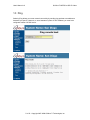
Selecting Ping allows you to test network connectivity by sending ping packets to an address or
hostname you specify. However, to use a hostname in place of an IP address, you must have
configured at least one DNS server.
5 of 45 - Copyright 2007-2008 QVidium™ Technologies, Inc.
User’s Manual v.6
QVidium™ MPEG2+4 SDI IP Codec
1.4 Passwords and Security
The QVidium MPEG2+4 SDI IP Codec requires a username and password to protect access to its
configuration settings. This includes both Web access and Telnet access. The default user name is
“root” and the default password is also initially set to “root.” You can change the password by
selecting the Password menu item under the System Menu at the upper left of the Web page.
1.5 Resetting to Default Settings
If you later forget the password or IP address, you can reset the these settings back to their initial
factory defaults by pressing and holding the reset button in the small hole found on the side of the
Codec for more than 2 seconds. As mentioned above, this reset will reset the networking settings
to the default IP address of 192.168.1.100 and the password back to “root.”
1.6 Upgrading
QVidium provides firmware upgrades from time to time to add new features, overcome limitations,
or to fix bugs. QVidium would provide any upgrades as a .pkg file that you can upload into the
Codec via the web browser interface. To perform an upgrade, just follow the following steps:
1) Copy the upgrade .pkg file into a convenient location on your PC.
2) Point your web browser to the Codec and click on “Upgrade” in the “System” menu.
3) Click on the “Browse” button and locate the upgrade file.
4) Click on “Upgrade” and wait for the upgrade to finish. DO NOT DISCONNECT FROM
POWER OR INTERRUPT THIS OPERATION UNTIL IT COMPLETES.
5) Click on “Reboot” from the system menu to reboot the Codec.
6 of 45 - Copyright 2007-2008 QVidium™ Technologies, Inc.
User’s Manual v.6
QVidium™ MPEG2+4 SDI IP Codec
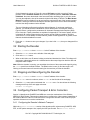
1.7 System View
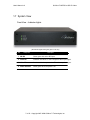
Front View – Indicator Lights
(All indicator lights either glow green or are off.)
Ref
Component
Description
1 SDI RX
Glows green with active SDI input.
2 Video RX
Indicates valid NTSC or PAL composite video input signal.
3 Video TX
On when video is output on the SDI and composite outputs.
4 Power Indicator
Glows green when the power is on.
7 of 45 - Copyright 2007-2008 QVidium™ Technologies, Inc.
User’s Manual v.6
QVidium™ MPEG2+4 SDI IP Codec
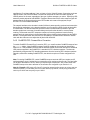
Rear View – I/O Connectors, Ethernet Port, & RS-232 Port
Reset
(Connectors are listed left to right, top to bottom.)
Ref
Component
Description
1 AC Power
Auto-sense AC power input (100-240Vac, 50/60Hz, 30VA).
2 USB Input
Reserved for future expansion.
3 10/100 Ethernet
RJ-45 port Fast Ethernet network connection.
4 RS-232
DB-9 RS-232 connector for future expansion.
5 SDI Video Input
SMPTE 259M video input with embedded audio.
6 Composite Video In
Composite video input (PAL/NTSC).
7 Left Audio Input
Left audio input channel.
8 Right Audio Input
Right audio input channel.
9 SDI Video Output
SMPTE 259M video output with embedded audio.
10 Composite Video
Composite video output (PAL/NTSC).
11 Left Audio Output
Left audio output channel.
12 Right Audio Output
Right audio output channel.
Note: Model number and serial number are clearly labeled above Ethernet port.
8 of 45 - Copyright 2007-2008 QVidium™ Technologies, Inc.
User’s Manual v.6
2
QVidium™ MPEG2+4 SDI IP Codec
Encoder Configuration and Operation
The encoder is configured and operated from the web browser. This section explains how to
configure and operate the Codec as a video encoder.
2.1 Configuring the Encoder
1. Enter http://IPAddress where IPAddress is the IP address of the QVidium MPEG2+4
SDI IP Codec. (The default address is http://192.168.1.100.)
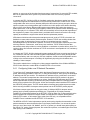
2. Click on “Profile” under “Encoder” from the menu on the left. “The Encoder Profile”
interface should display in the main area to the right of the menu system, as shown in
Figure 1.
3. Enter the destination IP address and UDP port number, transport stream (TS) bitrate, and
modify the other audio and video parameters, such as Composite or SDI Video Input, Video
Resolution, NTSC pr PAL Video Format, and Audio Bitrate (in Kbps), to suit your needs. If
you do not wish to encode audio along with the video signal, select 0 for the Audio Bitrate.).
The user interface will warn you if you try to enter a bit rate beyond the operating limits of the
codec. For more details on the range of MPEG encoding bit rates, please see Appendix C
(Section 12.3). For more information on the various video parameters (Frame Rate,
Encoding, Format, Resolution, etc.) please see Appendix A (Section 12.1).
4. Press the “Save” button to save your changes. None of your changes will be saved nor have
any effect unless you first save them.
Note: The maximum audio input signal is -1 dBu (0.976 Volts peak, 0.690 mV rms). Above this
level, the audio signal will clip (flatten out). By default, an MPEG2+4 IP Codec configured as a
decoder outputs the analog audio signal with a total system gain of 1.83. (As explained in Section
3.2, you can adjust the decoder audio output signal level.)
2.2 Starting the Encoder
Enter http://IPAddress where IPAddress is the IP address of the encoder.
1. Select the Encoder menu on the left side of the web page.
2. Select the Start menu option underneath the Encoder menu.
2.3 Stopping and Reconfiguring the Encoder
Enter http://IPAddress where IPAddress is the IP address of the encoder.
1. If the Encoder menu is not shown, select Encoder on the left side of the web page.
2. Select the Stop menu option underneath the Encoder menu. You should see the following
message at the top of the web page main area.
Encoder is Stopped.
9 of 45 - Copyright 2007-2008 QVidium™ Technologies, Inc.
User’s Manual v.6
QVidium™ MPEG2+4 SDI IP Codec
3. To reconfigure the encoder, go back to the steps in Sections 2.1 and 2.2.
NOTE: Changing between encode and decode modes requires power cycling the system.
Figure 1: Encoder profile form.
2.4 Configuring Packet Transport & Error Correction
The QVidium MPEG2+4 SDI IP Codec features some of the most powerful and advanced error
correction capabilities found in any video over IP product. The QVidium MPEG2+4 SDI IP Codec
has both industry standard ProMPEG FEC error correction and QVidium ARQ error correction.
QVidium’s patent-pending ARQ (Automatic Retransmission Request) provides the most robust
possible error correction over wireless networks and the Internet. ARQ senses packet loss at the
receiver and requests replacement packets from the server. ARQ can provide nearly flawless
reproduction of a video stream even through extremely lossy or congested networks.
For interoperability with a wide array of broadcast-quality video and networking equipment, the
QVidium MPEG2+4 SDI IP Codec implements the latest ProMPEG Code of Practice 3, release-2
video/IP encapsulation and forward error correction (FEC). FEC attempts to anticipate and avert
packet loss by sending redundant packets calculated from buffering a large array of outgoing
packets, and then using that redundant information at a receiver to reconstruct lost packets.
Unfortunately, the accurate prediction of packet loss is impossible on most Internet and wireless
connections. Thus FEC increases latency and link loading, yet cannot generally restore all lost
10 of 45 - Copyright 2007-2008 QVidium™ Technologies, Inc.
User’s Manual v.6
QVidium™ MPEG2+4 SDI IP Codec
packets, or even most of the lost data from these types of connections. So even with FEC enabled,
there is no guarantee that the system can produce usable video over severely impaired
connections.
In contrast with FEC, QVidium’s ARQ is a feedback mechanism that detects packet loss at the
receiver and requests the retransmission of only those lost packets from a video source. A userconfigurable buffer at the receiver (decoder) delays the video stream just long enough to allow the
system to replace any missing packets and re-insert them in their proper order without disturbing
play out of the video stream. Because ARQ senses actual packet loss, rather than attempt to
predict packet loss, it can precisely and completely restore all lost packets without disturbing timing
of the video play out. In contrast to FEC, ARQ can successfully recover lost packets regardless of
the magnitude or pattern of the packet losses, provided that the network connection has enough
capacity to send both the original video stream and the replacement packets.
ARQ shares similarities with robust packet transport protocols, such as TCP/IP in that both use
feedback to create robust network packet transport. However TCP/IP uses a sliding window that
limits the number of packets that a source can have in transit and requires a positive
acknowledgement for each window of packets. This limits TCP’s throughput, especially over links
with long latencies. Furthermore, under heavy loss conditions, TCP/IP scales back the data
transmission rates and provides no concise deadlines or constraints on packet delivery times. For
real-time video, this limits the usefulness of TCP/IP and makes it unacceptable for live, low-latency
video transport.
In contrast with TCP/IP, QVidium designed its patent-pending ARQ error correction specifically for
live, interactive, real-time video and audio signals to automatically recover nearly all lost packets
with minimal latency and over nearly any link loss conditions. It adds a small configurable amount
of delay to the network transport in exchange for significantly improving the robustness and
reliability of video transport.
This section explains how to configure the video transport capabilities of the QVidium MPEG2+4
SDI IP Codec and how to enable ARQ or ProMPEG FEC error correction.
2.4.1 Configuring Video over IP Network Parameters
To configure the IP network parameters, within the Network Parameters section of the encoder
profile, select among ProMPEG, ARQ, RTP, or UDP packet transport. Also, specify the destination
IP address and UDP port number. The destination IP address may be a multicast or a unicast IP
address. The encoder encapsulates the video and audio signals as UDP packets in all cases,
regardless of the type of packet transport you select. Specifying UDP eliminates the RTP header
and encapsulates the encoder’s constant bit-rate (CBR) multiplexed MPEG-2 transport stream
directly as the payload of the UDP packet. All the other transport selections add an RTP header to
the CBR UDP packet stream. The RTP header adds a timestamp and packet sequence number
before inserting the MPEG-2 transport stream packets into the RTP/UDP/IP packet payload.
All of these transport types insert an integral number of 188-byte MPEG-2 transport stream
packets into the packet payload as specified by the TS packets per IP packet parameter.
ProMPEG IP encapsulation adheres to the IETF/RFC 2733 for video over IP that specifies that the
packet payload must comprise an integral number of whole MPEG-2 transport stream packets
within an RTP header, so all transport types, aside from UDP-only, are compatible with the
ProMPEG Forum’s standard and the IETF/RFC 2733 standard.
The MPEG2+4 SDI IP Codec implements a special packet pacing algorithm that smoothes out the
packet transmission rate and minimizes jitter in the output packet stream. You can set the packet
pacing to one of three levels: Off, Medium, and Full. In general, you should leave packet pacing at
the default “Full” setting. Some equipment, like certain set-top boxes, can handle higher video rates
when pacing is set to Medium.
11 of 45 - Copyright 2007-2008 QVidium™ Technologies, Inc.
User’s Manual v.6
QVidium™ MPEG2+4 SDI IP Codec
2.4.2 ProMPEG FEC: Forward Error Correction
To enable ProMPEG Forward Error Correction (FEC), you must first select ProMPEG transport from
the Profile dialog. Also, ProMPEG transport must be enabled at the decoder. With ProMPEG
selected and the encoder started, the encoder will generate and intersperse parity checksum
packets along with the normally generated RTP/UDP/IP video stream. ProMPEG FEC uses
additional UDP ports for the parity checksum packets. Column checksum packets are sent on port
P + 2 and row checksum packets use port P + 4, where P is the UDP port that you configured for
the video over IP stream. By default, the video stream is on UDP port 10000, column checksum at
UDP port 10002 and row checksum packets on UDP port 10004.
ProMPEG FEC also dictates the use of a two-dimensional interleave matrix of packets. The FEC
algorithm specifies that FEC parity checksum packets be generated along the packet matrix
columns, and, optionally, rows. The MPEG2+4 SDI IP Codec creates and intersperses these parity
FEC packets according to the ProMPEG Forum’s Code of Practice #3, release-2, Annex A, which
staggers the insertion of checksum packets to minimize burstiness in the output.
When the FEC Type parameter is set to Row and Column row parity packets are generated in
addition to the column parity packets. When the FEC Type parameter is set to Column Only
column parity packets are generated, and row parity packet are not generated. The receiver can
automatically detect and process either types of FEC parity packets without requiring any specific
configuration other then enabling ProMPEG FEC.
Note: For testing ProMPEG FEC, we suggest using the default settings of 7 MPEG-2 TS packets
per IP packet, 10 rows, 10 columns, and checking Use Row FEC. Please make certain that
ProMPEG transport has been selected at both the encoder and the decoder.
Note for Firewalls: UDP ports at P+2 and P+4 must be opened to allow access to column and row
checksum packet. (P is the UDP port for the video stream.) By default, column parity packets are
sent on port 10002 and row parity on port 10004.
12 of 45 - Copyright 2007-2008 QVidium™ Technologies, Inc.
User’s Manual v.6
QVidium™ MPEG2+4 SDI IP Codec
2.4.3 ARQ: Automatic Retransmission Request
To enable Automatic Retransmission Request (ARQ), you must first select ARQ transport from the
Profile dialog. ARQ transport must also be enabled at the decoder. With ARQ selected and the
encoder started, the encoder will begin to save outgoing packets for later retransmission, when
necessary. You must also be certain to configure any firewalls to allow the ARQ retransmission
request packets through. The default port for these upstream ARQ request packets is UDP port
7020, although you can configure this to any other valid, non-conflicting UDP port. However, if you
choose to change the ARQ request port, you must make certain the settings at the encoder and
decoder match.
At the receiver, the ARQ error correction mechanism first buffers incoming packets in a
synchronized network de-jitter buffer that maintains a constant, configurable delay for incoming
packets. The de-jitter buffer processes RTP sequence numbers and reorders packets as necessary
to restore proper packet sequence and to buffer against erratic network delays. Its goal is to output
a smooth, consistent flow of packets with increasing sequence numbers. This output feeds the ARQ
error correction mechanism.
The ARQ unit at the receiver watches for gaps in RTP sequence number from the de-jitter buffer
output, and immediately sends out retransmission requests when necessary. Incoming
retransmitted ARQ packets bypass the de-jitter queue and find their correct place in the ARQ buffer,
so that by the time packet are output by the ARQ buffer, the ARQ error correction mechanism
should no longer contain any missing packets.
When the encoder and decoder are both started, the decoder automatically measures the round-trip
delay and packet jitter to the encoder and automatically configures ARQ for optimal operation
according to a few basic user-specified parameters, as described in Section 3.4.3.
Note: For testing ARQ error correction, select ARQ transport at both the encoder and decoder and
use the default ARQ parameters at the decoder (receiver).
13 of 45 - Copyright 2007-2008 QVidium™ Technologies, Inc.
User’s Manual v.6
3
QVidium™ MPEG2+4 SDI IP Codec
Decoder Configuration and Operation
As with the encoder, the decoder can be configured and operated from a web browser. This section
describes how to configure and operate the decoder.
3.1 Decoding Profile and Web Interface
You must use the web interface to edit the decoding profile.
Enter http://IPAddress where IPAddress is the IP address of the decoder. For example,
http://192.168.1.100.
1. Make certain that the encoder is stopped as explained in Section 2.3.
2. Select the Decoder menu on the left side of the web page.
3. Select the Profile menu option underneath the Decoder menu.
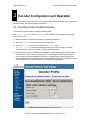
A Decoder Profile interface should display in the main area to the right of the menu
system as shown in Figure 2a through 2c, below and in Appendix B.
4. Edit the decoder profile. Five tabbed forms together comprise the complete decoder profile.
These 5 forms, three of which are shown in Figures 2a through 2c, allow configuration of:
video decoding, network configuration, ARQ error correction setup, and configuration of a
remote QVidium video server and a remote QVidium MPEG2+4 Encoder, respectively. Please
refer to Appendix B for a detailed description of each of these parameters.
Figure 2a: Decoder profile form: “Decoding Tab”
14 of 45 - Copyright 2007-2008 QVidium™ Technologies, Inc.
User’s Manual v.6
QVidium™ MPEG2+4 SDI IP Codec
Figure 2b: Decoder profile form: “Network Tab”
On the Decoding tab, shown in Figure 2a, enter video Stream Type (Transport or Program),
Video Encoding (MPEG-2 or MPEG-4SP), and Video Format (NTSC or PAL) to match the
encoder’s video settings. You should enter an estimate of the maximum anticipated incoming
bitrate into the Max Stream Bitrate field. Leaving this blank will default to a value of 4 Mbps.
An estimate less than the actual stream bitrate can cause pausing and freezing of the video.
Too large of an estimate will add unnecessary additional delay to the video output.
Figure 2c: Decoder profile form: “ARQ Tab”
15 of 45 - Copyright 2007-2008 QVidium™ Technologies, Inc.
User’s Manual v.6
QVidium™ MPEG2+4 SDI IP Codec
On the Network tab, shown in Figure 2b, enter a UDP port on which to receive IP video
packets. Enter a multicast address when receiving multicast packets, otherwise, leave this
field blank. Also enter the desired video format and video encoding type, to suit your needs.
You may also adjust the size of the network de-jitter buffer delay, if desired. The Max Stream
Bitrate field can be left blank if you do not know the maximum bit rate of the incoming stream.
However, entering a value here will help the decoder optimize the receive buffer and thereby
minimize the delay introduced at the decoder.
The next 3 decoder profile panels configure optional features. If you do not need these
features, you should leave them disabled or in their default state. The ARQ tab, shown in
Figure 2c above, configures the parameters for Automatic Retransmission Request (ARQ)
Error Correction. These parameters are explained in Appendix B. The last two panels, shown
in Appendix B, configure features that can control a remote QVidium encoder or QVidium
video server. For more details on these features, please consult Appendix B. In general, these
features should be disabled if not used.
5. Press the Save button to save your changes. If you don’t click Save, then your changes will be
ignored.
3.2 Starting the Decoder
Enter http://IPAddress where IPAddress is the IP address of the decoder.
1. Select the Decoder menu on the left side of the web page.
2. Click on the Start button.
3. When a valid video over IP stream is being received and decoded, the Video TX indicator will
glow green, indicating that there is a valid and active video output signal on both the SDI and
composite video outputs.
Note: While the decoder is running, you can adjust the volume of the output audio signal by using
the Volume panel from the Web interface. The default value is zero (0), and the range is ±27.
Clicking on the save button will save this setting for the next time you start the decoder.
3.3 Stopping and Reconfiguring the Decoder
Enter http://IPAddress where IPAddress is the IP address of the decoder.
1. If the Decoder menu is not shown, select Decoder on the left side of the web page.
2. Select the Stop menu option underneath the Decoder menu. You should see the following
message at the top of the web page main area.
Decoder is Stopped.
3.4 Configuring Packet Transport & Error Correction
Section 3.4 describes the ProMPEG and ARQ error correction mechanisms of the QVidium
MPEG2+4 SDI IP Codec. This section explains how to configure the video transport capabilities of
the QVidium MPEG2+4 SDI IP Codec and how to configure the decoder of the Codec for proper
operation of these error correction mechanisms.
3.4.1 Configuring the Decoder’s Network Transport
Within the Network Parameters section of the decoder profile, select among ProMPEG, ARQ,
RTP, or UDP packet transport. Also, specify the UDP port number. The Multicast Address
16 of 45 - Copyright 2007-2008 QVidium™ Technologies, Inc.
User’s Manual v.6
QVidium™ MPEG2+4 SDI IP Codec
specifies the IP multicast address, if any, to listen to for the Video/IP stream. If expecting a unicast
video/IP stream, leave this field blank. The decoder interprets the video and audio signals as
UDP/IP packets in all cases, regardless of the type of packet transport you select. Specifying UDP
treats the packet payload as raw MPEG-2 Transport Stream data. All the other transport types will
assume that the incoming packets have an RTP header at the start of the payload, as per
IETF/RFC 2733 and related standards.
The network interface to the decoder includes QVidium’s patent-pending synchronized network dejitter buffering mechanism. In the decode interface, you may specify a delay for this de-jitter buffer
in milliseconds. The decoder holds the specified number of milliseconds of packets to give the
decoder ample time to account for random delays and to allow the decoder to correct packet
ordering. The decoder uses RTP sequence numbers of incoming packets to insert incoming
packets into their proper place in the de-jitter buffer before releasing those packets into the MPEG
decoder. The de-jitter buffer also uses the RTP timestamp to synchronize the decoder’s network
clock with the video source to adjust the de-jitter buffer hold time.
3.4.2 ProMPEG FEC: Forward Error Correction
To enable ProMPEG Forward Error Correction (FEC), you must first select ProMPEG transport from
the Profile dialog. Also, ProMPEG transport must be enabled at the encoder as described in
section 2.4.2. With ProMPEG selected and the decoder started, the decoder will listen to additional
UDP ports as specified in the ProMPEG 3.2 standard for FEC checksum packets. The decoder
automatically configures the FEC decoding parameters from the incoming FEC checksum packets.
Therefore, aside from enabling ProMPEG FEC, the decoder requires no further configuration for
FEC.
Note: For testing ProMPEG FEC, select ProMPEG transport and enter UDP port number and IP
multicast address (only if multicasting) corresponding to the settings at the encoder. The jitter buffer
can be left at the default of 50 ms, unless you expect larger network jitter. Also, make certain that
ProMPEG transport has been selected on the encoder and configured as per Section 2.4.2.
Note for Firewalls: UDP ports at P+2 and P+4 must be opened to allow access to column and row
checksum packet. (P is the UDP port for the video stream.) By default, column parity packets are
sent on port 10002 and row parity on port 10004.
17 of 45 - Copyright 2007-2008 QVidium™ Technologies, Inc.
User’s Manual v.6
QVidium™ MPEG2+4 SDI IP Codec
3.4.3 ARQ: Automatic Retransmission Request
Automatic Retransmission Request (ARQ) tried to recover any packets lost during transport to the
decoder by adding a small amount of delay at the decoder during which time the decoder would
have time to detect and request any missing packets. The size of this delay should also include
adequate time for the missing packet to be received and inserted into the play out queue so that the
video stream can continue to flow smoothly and unimpeded to the MPEG decoder.
To enable ARQ, you must first select ARQ transport from the Profile dialog. Also, ARQ transport
must be enabled at the encoder. With ARQ selected and the decoder started, the decoder will
watch for gaps in the RTP sequence numbers from the output of the jitter buffer. When it detects
missing packets, it sends retransmission requests to the encoder so that the encoder can quickly
resend any missing packets. Incoming retransmitted ARQ packets bypass the network de-jitter
queue and find their correct place in the ARQ buffer, so that by the time packet are output by the
ARQ buffer, the output of the ARQ buffer should no longer contain any missing packets.
The ARQ has five parameters that can be configured in manual mode: Target Latency, Burst
Drop, Robust Mode, Number Retries, and Round Trip Time. In automatic mode, the
system automatically measures and calculates the Round Trip Time and Number Retries. In
most cases automatic mode and the default parameters should be adequate.
Of the required parameters, the first parameter, Target Latency, specifies the total delay, in
milliseconds, allotted for the request, retransmission, and recovery process. The ARQ mechanism
will attempt as many retries as possible within this target latency time. Thus, larger target latency
times increase the delay before video is output, but allows for more chances of requesting and
recovering any missing packets.
A Burst Drop delay can also be specified to delay any retransmission requests for a time equal to
the maximum expected packet loss time, such as from dynamic router changes of other sources of
burst loss.
A Robust Mode can also be selected. When selected (checked), a minimum of two tries will be
attempted for recovering any missing packets. When not selected (unchecked), ARQ will always try
at least once to recover any missing packets.
To help with firewall configuration and to handle potential port conflicts, the user can change the
default port that ARQ uses to send upstream retransmission requests, ARQ Port. However, you
must make certain that the same ARQ port number is set in both the encoder as in the decoder.
Although the automatic measurement of the round-trip time uses multiple measurements to take
into account random network delays, for some networks you might wish to specify a larger roundtrip value, or to specify a larger number of retries in case the upstream link loses some of the
retransmission request messages. In automatic robust-mode of ARQ operation, the system
automatically measures the round-trip time and divides that number into your specified Target
Latency to determine the number of retries to use. However in Manual Mode, you can force ARQ
to always use a specified number or retransmission requests.
Note: For testing ARQ error correction, select ARQ transport at both the encoder and decoder and
use the default ARQ parameters at the decoder (receiver). Please also be certain that ARQ has
also been selected at the encoder. Currently for ARQ, you MUST Enable pacing and limit the video
TS bitrate to 5.5 Mbps or less on the encoder.
18 of 45 - Copyright 2007-2008 QVidium™ Technologies, Inc.
User’s Manual v.6
4
QVidium™ MPEG2+4 SDI IP Codec
Codec Configuration and Operation
The QVidium MPEG2+4 SDI IP Codec can simultaneously encoder and decode two video over IP
streams, each one traveling in opposite directions over the same IP network. We call this mode of
operation “Codec” operation, in contrast to “Encode” or “Decode” operation. These two video
streams are completely independent of each other. However, a video encoding input signal must
be present before the codec can begin decoding and displaying an incoming stream.
In this Codec mode of operation, the codec encodes the video input signal using the stored
Encode Profile. The codec decodes the incoming IP video stream using the stored Decode Profile.
Clicking on “Start” under the Codec menu on the left side of the web page starts Codec operation.
“Stop” halts it.
Normally, when switching between the Encode and Decode modes of operation, the codec
currently requires that you power cycle the system. However, you can switch between starting the
Codec and the Encode modes of operation without power cycling.
19 of 45 - Copyright 2007-2008 QVidium™ Technologies, Inc.
User’s Manual v.6
5
QVidium™ MPEG2+4 SDI IP Codec
Importing and Exporting Profiles
Under the System you will find an Import menu item and an Export menu item. These two
operations provide a quick and easy means for transferring the configuration of one QVidium
MPEG2+4 SDI IP Codec to another MPEG2+4 SDI IP Codec. From the Web browser interface,
clicking on Export opens a panel that allows you to specify the name of a file to store configuration
information. To configure another codec with the same parameters, just point the browser to the
second Codec that you want to configure. You can then click on Import to automatically configure
that second codec, specifying the file you had just used to save the configuration of the first codec.
20 of 45 - Copyright 2007-2008 QVidium™ Technologies, Inc.
User’s Manual v.6
6
QVidium™ MPEG2+4 SDI IP Codec
SNMP Traps
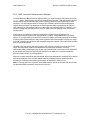
The MPEG2+4 SDI IP Codec implements SNMP v1 and v2c traps. SNMP traps allow you to
remotely monitor several possible fault conditions. To enable SNMP trap notifications, set the IP
address of the PC or device that will receive the traps, and set the Send Traps radio button to
“Yes”. The Codec will then send a trap notification to the trap address you specify upon the
occurrence of any of the following trap conditions:
•
•
•
•
•
Notification 1: Network packet loss or a lost packet that the error correction could not recover
Notification 2: Loss of video signal (no video sync present)
Notification 3: Loss of network stream (zero input network bit rate)
Notification 4: Restoration of video signal (video sync present again after loss)
Notification 5: Restoration of network stream (valid network stream resumes after interruption)
You can download the SNMP MIB text file for either SNMP v1 or SNMP v2 by clicking on the
corresponding Get MIB menu item. The MIB provides a more detailed description of these
SNMP notifications.
Figure 3: SNMP trap configuration.
21 of 45 - Copyright 2007-2008 QVidium™ Technologies, Inc.
User’s Manual v.6
7
QVidium™ MPEG2+4 SDI IP Codec
Resetting Flash Memory
The MPEG2+4 IP Codec uses non-volatile flash memory module to store all boot code and system
settings. It incorporates two levels of flash memory: a low-level read-only partition that stores a
complete image of the operating system and factory default settings, and a writable, applicationlevel partition that stores the working settings and current application code. When the device
powers up, it loads the operating system from the low-level flash partition into system RAM and
begins execution from system RAM. When the codec starts encoding or decoding, or when you
use its web interface, the codec executes application programs, web pages, and scripts stored in
the upper application-level flash partition. The codec also stores any system updates or changes to
the current system settings in this upper-level of flash memory, including the IP address and
password.
Should you forget the systems IP address or password and wish to restore these to a know
factory-default state, or if somehow the upper-level of flash becomes corrupted, such as by losing
power when doing an update, the codec can be brought back to its factory-default state by
following the procedures below. The codec has four different reset procedures for different levels
of restoration subdivided into two categories: resetting flash default system parameters and
settings, and re-initializing flash memory. These four reset procedures are listed here in order from
least intrusive to completely erasing and re-initializing the entire application-level partition of flash.
The first category, resetting flash parameters, involves holding in the reset button during normal
operation. The second category requires that the system reset button be held in during boot-up.
You can find the Reset button on the back of the MPEG2+4 SDI IP Codec between the RS-232
port and the composite video input (see Rear View photo in Section 1.7.)
7.1 Resetting Flash Parameters
To restore the codec’s settings, these following reset modes apply when holding in the reset
button at anytime during normal operation of the codec.
• Resetting System Password
During normal operation, depressing the reset button for 2 or more seconds (but less than 8
seconds) will reset the codec’s password to the factory default of “root” (username is also “root”).
It will also send out a gratuitous ARP reply packet. Using network monitoring software, such as
Wireshark, Ethereal, or NetMon, you can detect this ARP packet and determine the codec’s
current IP address.
• Restoring All System Settings
Holding in the reset button for 10 or more seconds during normal operation restores all system
settings to their factory default values, and also sends out an ARP reply packet. The IP address
will be restored to 192.168.1.100, the netmask to 255.255.255.0.
22 of 45 - Copyright 2007-2008 QVidium™ Technologies, Inc.
User’s Manual v.6
QVidium™ MPEG2+4 SDI IP Codec
7.2 Re-Initializing Flash Memory
Depressing the reset button during reboot (within the first few seconds after applying power or
rebooting the system) will erase and restore the application partition of flash memory from a factory
default copy stored in the lower-level of read-only flash memory.
• Cleaning Flash and Restoring Application Memory – Retains User Settings
Holding in the reset button for more than 15 seconds (but less than 30 seconds) during reboot
will erase all of the contents of the application partition of flash memory and restore it with the
default version of the codec applications and web pages from default image stored in the lowerlevel, read-only partition of flash memory. However, this reset mode will first save all user settings,
such as IP address and password, and then restores these settings after it restores the application
software.
• Initializing Flash and Restoring Application Memory – Factory Settings
Holding in the reset button for more than 30 seconds during reboot will first re-initialize and
reformat flash memory before restoring the default application software. It will also erase any user
settings and completely restore the entire system to factory default settings. (However, it will
attempt to save and restore any license files.)
NOTE: USE THIS RESET MODE AS A LAST RESORT, such as if the system becomes
completely unresponsive.
23 of 45 - Copyright 2007-2008 QVidium™ Technologies, Inc.
User’s Manual v.6
8
QVidium™ MPEG2+4 SDI IP Codec
System Management & Logging
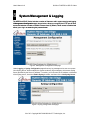
The MPEG2+4 SDI IP Codec includes a number of features to aid in system security and logging.
A Management Configuration page, shown below, allows you to specify the HTTP port for web
access and whether to enable or disable Telnet access. By default, Telnet access is enabled and
allows you to log in as root using the password root.
Figure 4: Management Configuration web page.
Under Logging, a Syslog Configuration page allows any log messages to be sent to a remote
Linux Syslog Server. When enabled, the system sends any log messages to this remote Syslog
Server specified by the Server IP address. To enable, you must enter the IP address or hostname
of the Syslog server, check the Enable Syslog checkbox, and then click on Set Syslog Server.
Figure 5: Syslog Configuration web page.
24 of 45 - Copyright 2007-2008 QVidium™ Technologies, Inc.
User’s Manual v.6
QVidium™ MPEG2+4 SDI IP Codec
Under the Messages menu, you can view the local system and kernel messages and
configure the amount of detail you wish to log. Unless you are debugging a particular
configuration or network setup, we suggest keeping the log message level at zero (0) to
conserve memory space. Every time you reboot or cycle power on the MPEG2+4 Codec,
all local messages are lost. Thus, for more permanent logging, we suggest configuring a
Syslog Server as described above.
25 of 45 - Copyright 2007-2008 QVidium™ Technologies, Inc.
User’s Manual v.6
9
QVidium™ MPEG2+4 SDI IP Codec
RS-232 Control over IP
Some applications may require transmission of data over a remote RS-232 connection to provide
serial control of a remote piece of video equipment. Examples of this type of remote RS-232
control may include adjustment of video camera settings, or pan, tilt, and zoom of a remote
camera.
The QVidium MPEG2+4 SDI IP Codec can connect the RS-232 port on one QVSDI Codec to the
RS-232 port on another QVSDI Codec via the same IP network link that it uses for video and audio
streaming. To create an RS-232 connection over IP, you must be running one QVSDI Codec as an
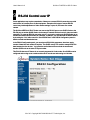
encoder and another QVSDI Codec as a decoder. In addition, you must activate the RS232 feature
by checking the “Yes” radio control for “Send RS232 Data” in the RS232 Configuration panel on
both the encode and decode devices.
In the RS232 Configuration panel, you can also set RS-232 link parameters, baud rate, parity,
number of data bits, and number of stop bits. The QVSDI uses a TCP socket to transport RS-232
data between the two devices. You must also set the Network Port on both the encode and
decode QVSDI units to the same TCP port number.
This RS-232 data over IP feature is not currently supported in Codec mode. One QVSDI must be
configured and running as an encoder and the other must be set and running as a decoder.
26 of 45 - Copyright 2007-2008 QVidium™ Technologies, Inc.
User’s Manual v.6
10
0
QVidium™ MPEG2+4 SDI IP Codec
Codec Manager
QVidium supplies an application we call CodecManager as a free download for its customers
http://www.qvidium.com
under the Downloads section of the QVidium web site at http://www.qvidium.com.
CodecManager will detect any MPEG2+4 SDI IP Codecs and MPEG2+4 SDI Codecs connected
through Layer-2 switches over the local-area network. At launch, CodecManager sends a Layer-2
MAC broadcast to which the QVidium products respond with their MAC address, IP Address, and
name. From this application, you can double-click on a Codec to launch a browser window to that
Codec. In addition, CodecManager makes it simple to change the IP Address, launch a Telnet
window, or edit other settings of any Codec it detects directly from the CodecManager application,
even if several codecs are mis-configured with the same IP address. You can also instantly stop all
codecs by the simple click of a button.
We encourage you to download and use the CodecManager application to manage your QVidium
products, since it is easier, more convenient, and less intrusive than resetting the Codec flash
settings.
27 of 45 - Copyright 2007-2008 QVidium™ Technologies, Inc.
User’s Manual v.6
11
QVidium™ MPEG2+4 SDI IP Codec
Known Problems
The following problems are currently known to exist:
1) To start encoder or codec after decoder, must cycle power
2) To start decoder after running encoder or codec mode, must cycle power
28 of 45 - Copyright 2007-2008 QVidium™ Technologies, Inc.
User’s Manual v.6
12
2
QVidium™ MPEG2+4 SDI IP Codec
Troubleshooting & Support
12.1 Troubleshooting – Common Problems
No response from web browser or cannot ping system
1. Make certain that device is powered on and connected to your network.
2. Check that green LAN light in front is lit and link light at RJ-45 port is on.
3. Make certain that device is on the same subnet as the computer you plan to connect to.
(Either use a cross-over Ethernet cable to connect directly to the computer or connect
through the same switch as your computer.)
4. Use QVidium’s CodecManager application to find IP address of system and to confirm that
Codec is online. You can download CodecManager from QVidium’s Download page
http://www.qvidium.com/), click on Downloads, and scroll down to the QVidium Codec
((http://www.qvidium.com/
Management Software section. Download and install the file: QVidiumCodecManagerX.msi (X is the current version number). If that fails to locate your Codec, then continue to
step 5.
5. Locate reset button hole on side of box to the left of “PWR” LED
6. Use a straightened paperclip to depress and hold the reset button for 10 seconds.
7. Open a shell window (On Windows™ select “Start/Run…” and type “cmd”).
8. Clear the ARP cache by typing “arp –d” and hit Enter.
9. Try pinging the system by typing “ping 192.168.1.100”.
Cannot get encoder to send IP packets
1. Check that a valid video signal is connected to the video Input you have configured. (Use
the Encoder/Profile page to select among Composite, S-Video, and CATV. Make certain
that you Saved the profile and afterwards hit the Start menu item.
2. Make certain that device is powered on and connected to your network.
3. Check that green LAN light in front is lit and link light at RJ-45 port is on.
4. Make certain that you have entered the correct IP address for the destination (under
Encoder/Profile) and the correct gateway (under Network/Configure) if the receiver is on
another subnet.
5. Try pinging the destination system clicking on Network/Ping and entering the IP address for
the decoder device.
Cannot get decoder to display video
1. Use network monitor software on look for blinking link lights to be certain that the encoder is
sending packets to your decoder. If not, follow the steps for “Cannot get encoder to send
IP packets”. .
2. Make certain that device is powered on and connected to your network.
3. Check that green LAN light in front is lit and link light at RJ-45 port is on.
4. Try pinging the encoder by entering the IP address for the source device. For a MPEG2+4
29 of 45 - Copyright 2007-2008 QVidium™ Technologies, Inc.
User’s Manual v.6
QVidium™ MPEG2+4 SDI IP Codec
SDI IP Codec, try clicking on “Network/Ping”.
5. Make certain that both encoder and decoder are set to the same stream type (Program or
Transport), the same transport type (ProMPEG, ARQ, RTP, or UDP) and encoding type
(MPEG2 or MPEG4). For a Set-Top Box, such as an Amino, make certain that the encoder
is set to Transport & UDP.
30 of 45 - Copyright 2007-2008 QVidium™ Technologies, Inc.
User’s Manual v.6
QVidium™ MPEG2+4 SDI IP Codec
12.2 Support
For technical help or to obtain the latest firmware updates, we kindly ask that you first contact the
reseller or distributor from whom you purchased your QVidium product. If you still require further
assistance, or you purchased your product directly from QVidium, please contact QVidium
Technologies, Inc. by either phone or e-mail at:
Phone: (858) 792-6407
Phone Support Hours: Monday - Friday 8:30 am to 5:00 pm PST
E-mail: [email protected]
E-mail Support Hours: 24-hour
31 of 45 - Copyright 2007-2008 QVidium™ Technologies, Inc.
User’s Manual v.6
13
QVidium™ MPEG2+4 SDI IP Codec
Appendix
13.1 Appendix A: Encoder Configuration Parameters
This section explains the parameters related to the analog input signals and encoding
settings and how they relate to the operation of the encoder and error correction and
network transport setup.
Stream Transport Type (Transport or Program): Specifies whether the multiplex the
video and audio streams as a single MPEG-2 Transport Stream or an MPEG-2 Program
Stream. In both cases, the MPEG-2 Stream Type is independent of the video and audio
encoding. You can select either transport type with any of the other audio and video
parameters, including choice of video encoding.
Transport Streams are more robust, while Program Streams reduce transport throughput
overhead. DVDs and other recorded material typically use Program Stream, while
normally streaming video uses Transport Stream. Transport Stream includes slightly
higher throughput overhead by repeating stream information at regular intervals so that a
decoder can more easily recover when an IP network loses part of the stream. However,
when a network link has very limited bandwidth, you can select Program Stream to lower
the stream bitrate.
Transport Stream Bit Rate: Total constant bit rate for aggregate multiplexed multimedia
stream. The transport stream bit rate includes the video program, audio program and
program stream information. The encoder automatically sets the video encoding bit rate
taling into account the transport stream rate minus the audio and program stream
information rates. The transport stream bit rate is specified in bits per second and can
range from 2.5 Mbps to 7.5 Mbps for 720x480, 704x480, 640x480, 720x576 and 704x576
resolutions or can range from 600Kbps to 7.5 Mbps for 352x240, 320x240 and 352x288
resolutions. The higher the bit rate, the better the video quality.
Audio Bit Rate (compressed): The audio bit rate determines encoding audio quality and
allows you to trade off audio throughput for quality. The audio bit rate can be set to one of
32,000, 64,000, 128,000, 192,000, 256,000 or 384,000 bits per second. Increasing the
audio bitrate, up to a maximum value of 384 Kbps increases the audio fidelity. Regardless
of the audio signal level on either channel, selecting an audio bitrate of 64 Kbps or higher
will always force the encoder to send 2 channels of audio (stereo audio). Each audio
channel uses one-half of the selected audio bitrate. Selecting 32 Kbps for the audio bitrate
will discard the right audio channel (red connector) and only send the left channel of
audio. Selecting zero (0) will disable the transmission of audio altogether. The MPEG2+4
SDI IP Codec encodes audio using MPEG-1 Layer II encoding.
32 of 45 - Copyright 2007-2008 QVidium™ Technologies, Inc.
User’s Manual v.6
QVidium™ MPEG2+4 SDI IP Codec
Audio Sampling Rate (Hz): The audio sampling rate specifies the clock rate for capturing
and digitizing the incoming analog audio signal. Because of anti-aliasing filtering, the
maximum audio frequency that can be digitized is limited to a frequency of about 1/3 to
1/2 of the audio sampling rate. Internal anti-aliasing filters severely attenuate audio
signals above a frequency of about 1/3 of the sampling rate. Thus, for a standard music
CD rate of 44.1 KHz, the maximum audio frequency that the encoder can pass is about
14.7 KHz. The valid selectable audio sampling clock rates are 22.05 KHz, 32 KHz, 44.1
KHz, and 48 KHz.
SDI formatting requires that the audio sampling rate be fixed at 48 KHz, so the user
interface disables setting this parameter when you select SDI input.
Video Frame Rate (Full Frame Rate and fractions thereof): Select Full Frame Rate for
normal video. This will encode the video signal at 29.97 frames per second for NTSC and
25 fps for PAL video format. If you need to produce lower video bitrates, and reducing the
resolution is not sufficient or undesired, you can use this feature to sacrifice frame rate for
lower bitrates. However, to use thus feature you must select MPEG-4 SP encoding and
Program Stream transport.
By reducing the frame rate, you can reduce the stream bitrate to a minimum value of 143
Kbps. In general, reducing the frame rate also reduces the required video bitrate by the
same factor. You can select factors of one-half (1/2), one-third (1/3) and other fractions
down to one-sixth (1/6) of the standard NTSC or PAL frame rate. However in any case,
the minimum allowable stream bitrate has a lower limit of 143 Kbps.
Video Encoding: The MPEG2+4 SDI IP Codec digitizes an analog composite or S-Video
signal according to the ITU-R.BT-656 standard, performs a 4:2:2 to 4:2:0 conversion and
compresses the digitized video using either the MPEG-2 video encoding standard
(MP@ML, ISO/IEC-13818-2) or MPEG-4 simple profile (SP @ L1, L2, & L3 with
extensions for D1 and interlacing, ISO/IEC 14496-2) compression as selected. MPEG-2
generally produces better quality video compression at video bitrates above 2.5 Mbps.
MPEG-2 produces I, P, and B-Frames and will always produce a constant 29.97 (or 25.0)
fps frame rate.
We suggest that you select MPEG-4 compression at lower bitrates (especially 1.5 Mbps
and lower). With MPEG-4, you can also select lower frame rates and it also includes a
number of newer encoding techniques and degrees of freedom in compressing the video
that are not available for MPEG-2. However, the MPEG-4 compression of the MPEG2+4
IP Codec is Simple Profile (Part 2 of the ISO MPEG-4 standard), meaning that it will not
produce B-Frames (Bi-directional interpolated prediction frames), which is a
disadvantage compared with MPEG-2 main profile encoding.
Video Format: This allows selection between the NTSC standard as used in North
America and Japan and the PAL video format used in Europe. The video format specifies
both a set of permissible video resolutions and a video frame rate. NTSC captures
interlaced video at 29.97 frames per second, while PAL captures interlaced video at 25
frames per second.
33 of 45 - Copyright 2007-2008 QVidium™ Technologies, Inc.
User’s Manual v.6
QVidium™ MPEG2+4 SDI IP Codec
Video Resolution (NTSC and PAL): The video resolution for Standard Definition video
(D-1 resolution) is 720x480 pixels for NTSC resolution (480i) and 720x576 pixels for PAL
video format (576i). This is the resolution commonly used for DVDs and Standard
Definition broadcasting. When you need to encode the video at lower bitrates, the
MPEG2+4 Codec allows you to select lower resolutions (352x480 and 352x240 for NTSC
and 352x576 and 352x288 for PAL). Computers, unlike video monitors, use square pixels.
The MPEG2+4 Codec allows for 640x480 (4CIF), 480x480, and 320x240 (CIF) computer
resolutions.
The lowest resolution that the MPEG2+4 Codec supports is 352x240 for NTSC, 320x288
for PAL, and 340x240 for computer monitors. Separate pull-down menus allow
independent selection of NTSC and PAL resolutions. The configuration only makes use of
the appropriate menu for the video format you select and ignores the setting for the nonappropriate resolution.
Video Resolution (NTSC): The user can select from among 5 standard video resolutions
used with NTSC video: 720x480, 704x480, 640x480, 480x480, 352x480, 352x240, and
320x240. All resolutions are specified as horizontal pixels x vertical pixels. The three
resolutions, 640x480, 480x480, and 320x240, are for use with computer displays and
other devices that display square pixels.
Video Resolution (PAL): The selectable PAL resolutions are: 720x576, 704x576,
640x576, 480x576, 352x576, 352x288, and 320x288 (horizontal x vertical pixels).
Video Aspect Ratio (4:3 or 16:9): Standard Definition NTSC video has a 4:3 aspect ratio.
This is the default setting. However, many new HD Camcorders and video mixing
equipment have NTSC composite outputs. Setting the Aspect Ratio to 16:9 sets bits in the
MPEG elementary stream that tell an MPEG decoder to decode the incoming video
stream with this aspect ratio. However, it does not change the encoding resolution.
Video Input: This selects between SDI and composite video inputs. Selecting SDI video
disables the analog audio inputs. The MPEG2+4 SDI IP Codec uses embedded digital
audio from the SDI input when you select the SDI video input.
Network Parameters
The fields below relate to Ethernet/IP video transport settings.
IP Transport: This selects the type of video IP packet encapsulation and error correction
used by the codec in generating a Video/IP stream. All packetized video transport
mechanisms encapsulate a multiplexed constant bit rate MPEG-2 transport stream.
•
ProMPEG is the default and enables an interleaved, parity-based forward error
correction (FEC) as per the ProMPEG Forum’s Code of Practice (COP) 3,
Release 2, Annex A and IETF RFC 2733 for IP encapsulation of video and audio
data.
•
ARQ uses QVidium’s patent-pending error correction mechanism based on a timeconstrained selective packet retransmission algorithm, in place of FEC. It also
34 of 45 - Copyright 2007-2008 QVidium™ Technologies, Inc.
User’s Manual v.6
QVidium™ MPEG2+4 SDI IP Codec
encapsulates the video as per COP3.2 (without the FEC) and RFC 2733. However
it relies upon an upstream channel on UDP port 7020.
•
RTP disables all error correction mechanisms, but still encapsulates the MPEG-2
multiplexed data according to RFC2733.
•
UDP is similar to the RTP transport above, but does not add the RTP header to the
UDP packets. Instead it simply encapsulates the MPEG-2 transport stream data
directly into the UDP/IP packet payload.
Destination IP Address or Hostname: This specifies the IP address or Hostname for the
Video/IP stream.
UDP Port: This specifies the UDP port number (P), base 10, for the Video/IP stream.
ProMPEG Column Parity uses the port at P+2 and Row Parity at P+4.
TS packets per IP packet: This field allows specification of the number of 188-byte
MPEG-2 Transport Stream packets per IP packet. The standard MTU for Ethernet packets
permits a maximum of 7 TS packets per IP packets, which is the default.
Unicast TTL (Time-To-Live): This sets the IP packet’s Time-To-Live field for unicast data
streams and thereby limits the number of intermediate IP router hops that each unicast IP
packet can travel before being dropped by a router. (A unicast packet is a packet destined
to travel to a single IP address.)
Multicast TTL (Time-To-Live): This sets the IP packet’s Time-To-Live field for multicast
data streams and thereby limits the number of intermediate IP router hops that each
multicast IP packet can travel before being dropped by a router.
TOS (Type-of-Service): The TOS (Type-of-Service) field in an IP packet specifies the
packet priority and type of differentiated services requested by the packet to each router at
each hop to a destination. Although setting this field will directly set the TOS byte field in
the IP packets for the output video stream, routers along the way may not necessarily
recognize or comply with this request.
Pacing (Full, Medium, or Off): MPEG video compression produces blocks of data with
each incoming frame or field. The size of these data blocks can vary by more than an
order of magnitude depending upon whether the data corresponds to an I-, P- or B-Frame.
Converting these data blocks into IP packets create intense bursts of packets of varying
magnitude for each video frame. Packet bursts can overwhelm the buffering at switches
and routers along the transmission path. The MPEG2+4 IP Codec includes a unique
packet-pacing mechanism that smoothes out irregularities in the inter-packet transmission
times. Enabling QVidium Packet Pacing will create a smoother, more evenly spaced
packetized video stream. However, Packet Pacing will also add latency to the video
transmission, due to the extra buffering required to store the packet bursts. Full Pacing,
while minimizing packet transmission jitter, can also cause compatibility problems with
some IP MPEG decoders. We therefore suggest leaving this setting at Medium for best
performance and widest compatibility with other video decoders.
35 of 45 - Copyright 2007-2008 QVidium™ Technologies, Inc.
User’s Manual v.6
QVidium™ MPEG2+4 SDI IP Codec
ProMPEG FEC
The parameters below ONLY pertain to ProMPEG forward error correction. They will be
ignored when ProMPEG IP Transport is not selected.
Columns: This sets the number of columns in the two-dimensional packet interleave
matrix used by ProMPEG Release 3 FEC to generate column parity checksum packets.
The larger this number, the larger a contiguous burst packet drop that the FEC can
handle will be. However, increasing the number of columns increases the transport
latency. Column packets are sent on port P+2 (default: 10002).
Rows: This sets the number of rows, R, in the two-dimensional packet interleave matrix. It
thereby sets the FEC overhead, since one FEC packet is generated for each R rows. Thus,
column-only FEC will add an additional 100/R percent to the baseline transport stream
bit rate without FEC. Row parity is sent on port P+4 (default: 10004).
In ProMPEG Release 3.2 FEC, a row parity packet can be generated along each row of
the interleave matrix. Thus for a matrix having C columns, one row parity packet would be
generated for each C columns. This can add an additional 100/C percent overhead to the
transport stream bit rate for when enabled. However, these row checksum packets will
NOT be generated UNLESS “FEC Type” (below) is "Row and Column" FEC.
FEC Type: This allows selection between "Column Only" FEC and "Row and Column"
FEC. Normally, FEC without row parity can be effective in reconstructing isolated single
and burst packet losses. However, should the packet loss patterns become more frequent
and occur at intervals less than the total (row x column) number of packets held in the
interleave array, then column-only FEC will not be completely effective in recovering lost
packets. The addition of row FEC increases the ability to recover lost packets when the
losses start to occur in shorter intervals.
ARQ
The parameters below ONLY pertain to ARQ error correction. They will be ignored when
ARQ IP Transport is not selected.
ARQ Port: By default, ARQ normally sends upstream retransmission request packets on
UDP port 7020. You can change this ARQ Port setting to any valid and non-conflicting
UDP port. However, you must make certain that you specify the same port number at both
the encoder and the decoder.
36 of 45 - Copyright 2007-2008 QVidium™ Technologies, Inc.
User’s Manual v.6
QVidium™ MPEG2+4 SDI IP Codec
13.2 Appendix B: Decoder Configuration Parameters
This section explains the parameters related to the setup and operation of the MPEG
Decoder, the error correction algorithms, and network transport configuration.
Stream Type: The MPEG2+4 SDI IP Codec can generate either an MPEG-2 Transport
Stream or an MPEG-2 Program Stream, modified to periodically transmit key video
parameters. For greatest robustness and interoperability with other video networking
equipment, we suggest using the default setting of Transport Stream. However for the
lowest possible stream bit rates, set the Stream Type to Program Stream.
Video Encoding: The MPEG2+4 SDI IP Codec generates analog composite and S-Video
outputs from a video/IP packet stream encoded using either the MPEG-2 video encoding
standard (MP@ML) or MPEG-4 simple profile ( ISO/IEC 14496-2) compression, as
selected.
Video Format: This allows selection between the NTSC standard as used in North
America and Japan and the PAL video format used in Europe for the analog output video
signal. NTSC generates interlaced video at 29.97 frames per second, while PAL generates
interlaced video at 25 frames per second.
Max Stream Bitrate: This parameter allows you to minimize the latency of the video
stream. You should enter an estimate of the maximum anticipated incoming bitrate.
Leaving this blank will default to a value of 4 Mbps. An estimate is less than the actual
stream bitrate may cause occasional pausing or freezing of the video. Too large of an
estimate will add unnecessary additional delay to the video output.
Network Parameters
The fields below relate to Ethernet/IP video transport settings.
IP Transport: This selects the type of video IP packet decapsulation and error correction
expected by the codec in receiving a Video/IP stream. All packetized video transport
mechanisms expect to receive a multiplexed constant bit rate MPEG-2 transport stream to
decapsulate and decode.
•
ProMPEG is the default and recovers lost packets from received ProMPEG FEC
checksum packets as per the ProMPEG Forum’s Code of Practice (COP) 3,
Release 2, Annex A and IETF RFC 2733 for IP encapsulation of video and audio
data.
•
ARQ uses QVidium’s patent-pending error correction mechanism for lost packet
recovery, in place of FEC. Like ProMPEG transport, it also expects to receive
video as per COP3.2 (without the FEC) and RFC 2733. However it relies upon an
upstream channel on UDP port 7020.
•
RTP disables all error correction mechanisms, but still decapsulates the MPEG-2
multiplexed data according to RFC2733.
37 of 45 - Copyright 2007-2008 QVidium™ Technologies, Inc.
User’s Manual v.6
•
QVidium™ MPEG2+4 SDI IP Codec
UDP is similar to the RTP transport above, but expects raw UDP packets without
an RTP header. It expects to receive the MPEG-2 transport stream directly from
the UDP payload. Use this setting for interoperability with some Set-Top Boxes.
Multicast Address: This specifies the IP multicast address, if any, to listen to for the
Video/IP stream. For receiving a unicast video/IP stream, leave this field blank.
UDP Port: This specifies which UDP port number (P), base 10, to listen on for the
Video/IP stream. Be certain to open also your firewall to port P+2 and P+4 for ProMPEG
FEC. (P+2 for column parity and P+4 for row parity packets.)
Jitter: Packets in incoming IP packet streams may lose their ordering or suffer variable
delays during transport through an IP network. The QVidium MPEG2+4SDI IP Codec
buffers all incoming video/IP packets in a buffer and reorders RTP encapsulated packets
by RTP sequence number. This parameter specifies the size of this incoming packet buffer
in milliseconds of delay. Specify 0 here to disable this additional buffering when latency
needs to be minimize.
ARQ Parameters
The parameters below ONLY pertain to QVidium ARQ error correction. They will be
ignored unless ARQ is selected for IP Transport.
Target Latency: QVidium’s ARQ error correction operates through the addition of a
small additional buffering delay to provide enough time to request and receive
replacement for each lost packet. Target Latency gives the ARQ mechanism a target value
for determining the necessary ARQ delay. The ARQ divides the Target Latency, specified
in milliseconds, by the round-trip time to the video encoding source to determine the
number of request attempts. Unless Robust Mode is enabled, it sets a minimum ARQ
latency of one round-trip time. A larger Target Latency allows the system to increase the
number or repeat requests.
Max Burst Drop: Burst packet losses are common occurrences in many IP networks and
the Internet. IP networks may dynamically change paths in response to load balancing,
link failure avoidance, and for other reasons. During a re-route, a sequence of queued
packets on a discontinued path may be dropped. A burst of packets may be dropped when
higher priority packets stall a lower priority buffer. ARQ will notice a burst packet loss
when the first packet after the loss arrives at the codec. Setting the Max Burst Drop Delay
(in milliseconds) will delay the ARQ repeat request by this amount to handle packet burst
losses.
Robust Mode: Normally, the ARQ will only require that a minimum of one repeat request
is sent to the video encoding source device, regardless of the Target Latency. However,
enabling Robust Mode will increase the minimum number of repeat requests to a minimum
of two retries.
ARQ Port: By default, ARQ normally sends upstream retransmission request packets on
UDP port 7020. You can change this ARQ Port setting to any valid and non-conflicting
38 of 45 - Copyright 2007-2008 QVidium™ Technologies, Inc.
User’s Manual v.6
QVidium™ MPEG2+4 SDI IP Codec
UDP port. However, you must make certain that you specify the same port number at both
the encoder and the decoder.
Server
The parameters below ONLY pertain to the operation of the QVidium MPEG2+4 SDI IP
Codec with a QVidium QoS Proxy Server. Leave this disabled when not connecting to a
QoS Proxy Server.
This feature allows the decoder to initiate and receive a unicast stream from a QoS Proxy
Server. You must provide the IP address and control port for the QoS Proxy Server. The
decoder then sends a control packet upstream to the server when you start the decoder.
Use Server: Select No to disable this feature. Select Yes to enable operation with a QoS
Proxy Server.
IP Address or Hostname: Enter the IP address of the QoS Proxy Server to which the
decoder will send a start-stream message.
Echo Port: Normally, this should be left to the default UDP port 7. This port number must
match the value at the QoS Proxy Server. In addition, you may need to configure a firewall
at the server to allow ingress for packets on this port.
39 of 45 - Copyright 2007-2008 QVidium™ Technologies, Inc.
User’s Manual v.6
QVidium™ MPEG2+4 SDI IP Codec
Notification
The parameters below ONLY pertain to QVidium sender-notification feature. This feature
allows the decoder to receive a unicast stream in applications where the decoder’s IP
address is not initially known or may change and when security concerns may not permit
multicast operation. In this mode of operation, the decoder transmits its IP address to a
specified encoder each time the decoder is started. The encoder then dynamically changes
its destination address to the address that it receives from the decoder each time the
decoder sends this notification to a different destination address to the encoder.
Notify Encoder: Select No to disable this feature. Select Yes to enable it.
Encoder IP Address: Enter the IP address of the encoder to which the decoder will send
the notification messages.
Encoder Password: The QVidium MPEG2+4 Codec implements password protection on
all access to its configuration settings. In order for the decoder to change the encoder’s IP
destination address, you must specify the password for the encoder in this field.
40 of 45 - Copyright 2007-2008 QVidium™ Technologies, Inc.
User’s Manual v.6
QVidium™ MPEG2+4 SDI IP Codec
13.3 Appendix C: MPEG2+4 SDI Codec Bitrate Limits
Decode Bitrate Limits
Bitrate limits related to receiving MPEG-2 Transport Stream video from the network:
Maximum MPEG-2 TS bitrates (MPEG-2 or MPEG-4):
• 6.5 Mbps for ARQ error correction
• 7.5 Mbps for ProMPEG FEC error correction
• 9.0 Mbps for UDP and RTP transport (no error correction)
Encode Bitrate Limits
Bitrate limits related to sending MPEG-2 Transport Stream (TS) and MPEG-2 Program
Stream (PS) video to the network. Unless noted otherwise, all bitrates below assume full
NTSC (29.9 fps) or PAL frame rates (25 fps).
Minimum bitrates assume zero audio bitrate. Selecting a non-zero audio bitrate increases
the minimum bitrate. The MPEG2+4 SDI IP Codec user interface will calculate and
enforce the correct minimum for any given set of video and audio encoding parameters.
The actual minimum bitrate will be determined by the user interface. The values here are
only provided as a guideline for estimating the required network loading.
Maximum MPEG-2 TS bitrates (full pacing enabled):
• 9.0 Mbps for ARQ error correction*
• 7.5 Mbps for ProMPEG FEC error correction
• 9.0 Mbps for UDP or RTP transport (no error correction)
* When streaming to other QVidium products and software applications, including:
StreamViewer software decoder, DVB-ASI/IP Gateway, MPEG2+4 CodecPro
Minimum MPEG-2 TS bitrates for MPEG-2 and MPEG-4(SP) Encoding:
• 2.42 Mbps for 720x480 video resolution
• 1.65 Mbps for 480x480 video resolution
• 1.24 Mbps for 352x480 video resolution
• 671 Kbps for 352x240 video resolution
• 619 Kbps for 320x240 video resolution
Minimum MPEG-2 PS (Program Stream) bitrates for MPEG-2 or MPEG-4(SP) Encoding:
• 2.31 Mbps for 720x480 video resolution
• 1.54 Mbps for 480x480 video resolution
• 1.13 Mbps for 352x480 video resolution
• 564 Kbps for 352x240 video resolution
• 512 Kbps for 320x240 video resolution
41 of 45 - Copyright 2007-2008 QVidium™ Technologies, Inc.
User’s Manual v.6
QVidium™ MPEG2+4 SDI IP Codec
Half Frame Rate Minimum MPEG-2 PS bitrates for MPEG-4(SP) Encoding:
• 1.16 Mbps for 720x480 video resolution
• 769 Kbps for 480x480 video resolution
• 564 Kbps for 352x480 video resolution
• 282 Kbps for 352x240 video resolution
• 256 Kbps for 320x240 video resolution
Note: Video quality is content dependent and at minimum bitrates may not produce
acceptable video for a given application. For bitrates under 1.5 Mbps, as a general
rule we suggest that you use MPEG-4 encoding for best video quality.
Codec (Bi-Directional) Bitrate Limits
Bitrate limits related to simultaneously sending and receiving a MPEG-2 Transport Stream
video to and from the network:
Maximum MPEG-2 Transport Stream bitrates:
• 3.0 Mbps with ProMPEG FEC
• 4.5 Mbps with UDP, RTP or ARQ
42 of 45 - Copyright 2007-2008 QVidium™ Technologies, Inc.
User’s Manual v.6
QVidium™ MPEG2+4 SDI IP Codec
13.4 Appendix D: Technical Specifications
Specifications
Network Interface:
•
1 IEEE 802.3 100/10 Base-TX Ethernet (RJ-45)
IP Network Stream Conditioning & Error Correction (EC):
•
QVidium patent-pending ARQ error correction
•
QVidium packet pacing
•
Pro-MPEG Forum COP #3 Release 2 FEC
•
FEC packet linearization as per Pro-MPEG Forum COP #3.2, Annex A
•
4-20 Rows x 4-25 Columns FEC Matrix
Network Protocols:
•
IP Encapsulation: RTP/UDP/IP and UDP/IP
•
IETF DiffServ and IEEE TOS compliance
•
IGMP v.2 Multicast, SNMP v.2 traps
•
DHCP
Audio/Video Interfaces:
•
•
•
1 SMPTE 259M SDI video input (BNC connector)
1 SMPTE 259M SDI video output (BNC connector)
SMPTE 272M-ABC SDI-embedded 2-ch AES audio
•
•
•
•
1 Composite video input (BNC connector)
2 Unbalanced audio inputs (RCA connectors)
1 Composite video output (BNC connector)
2 Unbalanced audio outputs (RCA connectors)
Stream Bitrate (Audio & Video):
•
400 Kbps to 9.0 Mbps (encode or decode no EC)
•
400 Kbps to 7.5 Mbps (encode or decode w/EC)
•
400 Kbps to 4.5 Mbps (bi-directional no EC)
•
400 Kbps to 3.0 Mbps (bi-directional w/EC)
Audio:
•
•
•
•
•
Video:
•
•
•
•
MPEG-1 Layer-II audio encoding, ISO/IEC-11172-3 Layer 2 standards compliant
Stereo bit rates: 64K, 128K, 192K, 256K & 384K bps
Sampling rates: 32K, 44.1K & 48K samp/sec
SDI embedded audio at 48 Ksamples/sec, 20 & 24-bit
Input audio signal levels up to -1 dBu (0.976 Vpeak)
4:2:0 MPEG-2 MP@ML encoding: ISO/IEC-13818-2 standards compliant
4:2:0 MPEG-4 Simple Profile @ L1, L2, & L3 with extensions for D1 and interlacing
NTSC: 720x480, 704x480, 640x480, 480x480, 352x480, 352x240, 320x240
PAL: 720x576, 704x576, 352x288
SDI: 720x480, 720x576
•
•
De-multiplex: MPEG-2 Transport & Program Streams
•
Encode Line 21 Closed Captioning (Teletext optional)
Serial Interfaces:
•
DB-9 RS-232 Interface: remote camera control over IP
•
USB Port for future expansion (storage, networking)
Configuration and Monitoring:
•
Web setup & monitoring interface over IP network
•
SNMP v1 & v2c traps
Electrical:
•
AC Power Input: 100-240Vac 50/60Hz, 30VA
•
Auto sensing AC power adapter included
43 of 45 - Copyright 2007-2008 QVidium™ Technologies, Inc.
User’s Manual v.6
QVidium™ MPEG2+4 SDI IP Codec
Mechanical:
•
Dimensions: 8.25”(W) x 6.5” (D) x 1.75” (H)
•
Dimensions (mm): 208 (W) x 165 (D) x 44 (H)
•
Unit Weight: 2.25 lbs (1.0 Kg)
•
Rack mount bracket
Environmental:
•
Operating temperature: 0 to 50o C
•
Operating humidity: 0 to 90% R.H., non-condensing
•
Non-operating temperature: -20 to 70o C
•
Non-operating humidity: 0 to 95% R.H., non-condensing
Regulatory:
•
RoHS, CE, and FCC compliant
Warranty:
•
Parts and labor: 1-year
44 of 45 - Copyright 2007-2008 QVidium™ Technologies, Inc.
User’s Manual v.6
QVidium™ MPEG2+4 SDI IP Codec
13.5 Appendix E: Product Warranty Terms and Conditions
1)
Warranty Statement
Thank you for purchasing a QVidium product. All QVidium products come with a one-year limited
warranty against defects in material and workmanship during the warranty period. If a product
proves to be defective in material or workmanship during the warranty period, QVidium will, at its
sole option, repair or replace the product with a similar product. Replacement Product or parts may
include remanufactured or refurbished parts or components. The replacement unit will be covered
by the balance of the time remaining on the customer's original limited warranty. QVidium provides
no warranty for the third-party software included with the product or installed by the customer.
QVidium does not warrant that the operation of any product will be interrupted or error free and
QVidium is not responsible for damage arising from failure to following instructions relating to the
product’s use.
2)
Warranty Conditions
The warranty is valid only for the first consumer purchaser and is not transferable. Proof of
purchase will be required for any limited warranty. The warranty does not cover: 1) any product on
which the serial number has been defaced, modified or removed or 2) Damage, deterioration or
malfunction resulting from: a) Accident, misuse, neglect, fire, water, lightning, or other acts of
nature, unauthorized product modification, or failure to follow instructions supplied with the product;
b) Repair or attempted repair by anyone not authorized by QVidium; c) Damage to or loss of any
programs, data or removable storage media; d) Software or data loss occurring during repair or
replacement; e) Any damage of the product due to shipment; f) Removal or installation of the
product; g) Causes external to the product, such as electric power fluctuations or failure; h) Use of
supplies or parts not meeting QVidium’s specifications; i) Normal wear and tear; j) Failure of owner
to perform periodic product maintenance; k) which has been subjected to unusual physical or
electrical stress, misuse, abuse, power shortage, or negligence or; l) Any other cause which does
not relate to a product defect.
3)
Warranty Procedure
For the duration of the warranty period, QVidium will replace or repair defective products. If a
product is suspected of being defective, the owner should contact the reseller or distributor that
sold the product. A representative will authorize the exchange or repair of the defective item.
Products must be shipped in the original or comparable packaging with shipping and insurance
charges prepaid in U.S. currency.
4)
Limitation of Warranty
Neither QVidium nor its third party suppliers make any other warranty or condition of any kind
whether expressed or implied, with respect to the QVidium products, and specifically disclaim the
implied warranties or conditions of merchantability, satisfactory quality, and fitness for a particular
purpose.
5)
Limitation of Liability
Except for the limited obligations specifically set forth in this warranty statement, in no event shall
QVidium or its third party suppliers be liable for direct, indirect, special, incidental, or consequential
damages, whether based on contract, tort, or any other legal theory and whether advised of the
possibilities of such damages.
Some states do not allow limitations on how long an implied warranty lasts or the exclusion or
limitation of incidental or consequential damages, so the above limitations and/or exclusions may
not apply to you. This warranty gives you specific legal rights and you may also have other rights
which vary from state to state.
45 of 45 - Copyright 2007-2008 QVidium™ Technologies, Inc.