1
inside a rack cabinet or directly into external receptacles. Similarly, the right and
left power supplies of the DS4000 storage subsystem that the EXP810 storage
expansion enclosures are attached to should be plugged into the same two
independent external power circuits as the EXP810s. This ensures that the
DS4000 storage subsystem and all its attached storage expansion enclosures
will have power in the event that only one power circuit is available. In addition,
having all the right or all the left power cables plugged into the same power
circuit enables the DS4000 devices in the configuration to power on
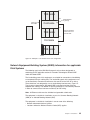
simultaneously during an unattended restoration of power. See Figure 34 on
page 55 for an example of redundant power connections.
Note: Do not overload the circuits that power your storage subsystem and
storage expansion enclosures. Use additional pairs of power distribution
units (PDUs) if necessary. Refer to Table 16 on page 21 for information on
storage expansion enclosure power requirements. Contact your IBM
service representative for additional information if needed.
v Before any planned system shutdown or after any system additions, removals, or
modifications (including firmware updates, logical drive creations, storage
partitioning definitions, hardware changes, and so on), complete the following
tasks:
1. Save the storage subsystem profile.
2. Save the storage subsystem configuration.
Make sure that you save the files in a location other than in the logical drives that
were created for the storage subsystem.
For more information on how to complete these tasks, check the DS Storage
Manager online help or the Storage Manager guide for your operating system.
v During any maintenance or attended power-up procedure, carefully follow the
power-up sequence listed in “Powering on the EXP810” on page 69. Check that
each component of the subsystem is powered-on in the proper order during this
entire power-up procedure to ensure the controller will be able to optimally
access all of your storage subsystems.
v The storage subsystem supports simultaneous power-up to the system
components; however, you should always follow the power-up sequence listed in
“Powering on the EXP810” on page 69 during any attended power-up procedure.
v A storage system in an optimal state should recover automatically from an
unexpected shutdown and unattended simultaneous restoration of power to
system components. After power is restored, call IBM support if any of the
following conditions occur:
– The storage subsystem logical drives and subsystems are not displayed in the
DS Storage Manager graphical user interface (GUI).
– The storage subsystem logical drives and subsystems do not come online.
– The storage subsystem logical drives and subsystems seem to be degraded.
Specifications
This section provides site specifications for the storage expansion enclosure. Before
installing a storage expansion enclosure, you must either verify that your planned
installation site meets these requirements, or prepare the site so that it does meet
these requirements. Preparations might involve meeting area requirements,
environmental requirements, and electrical requirements for storage expansion
enclosure installation, service, and operation.
18
IBM System Storage DS4000 EXP810 Storage Expansion Enclosure: Installation, User’s and Maintenance Guide