1
Wireless network adapter
2.
User manual
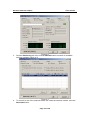
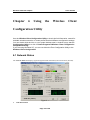
z Status: The status of the wireless network connection.
z Network SSID: The unique name of the wireless network.
z Network Type: The mode of the wireless network currently in use.
z Network BSSID: The MAC address of the wireless network’s access point.
z Security: The status of the encryption security feature.
z Link Speed: The data transfer rate of the current connection.
z Channel: The channel to which the wireless network devices are set.
Internet Protocol (TCP/IP)
z DHCP Option: The status of the DHCP client.
z IP Address: The IP Address of the Adapter.
z Subnet Mask: The Subnet Mask of the Adapter.
z Default Gateway: The Default Gateway address of the Adapter.
6.2 Site Survey
The Site Survey tab (Figure 6-2), displays a list of infrastructure and ad-hoc networks available for
connection.
Figure 6-2
The section of the window displays the Available Networks. Highlight the network to which you wish
to connect. Click on the Associate button.
Page 17 of 26