1
RalphLE
Start->AuSIM->Demo Applications->RalphLE Player
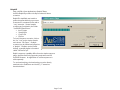
AuSIM's RalphLE provides a facility for advanced demo
scenarios.
RalphLE’s simplified user interface
makes it approachable by most users.
Scenarios are contained in files with a
“.seq” extension. Several sample
scenarios are furnished in the folder
“\AuSIM3D\Client\Demo”:
• IntroToApps
• StreetScene
• Cmd & Ctrl
• FlyOver
To load a sequence scenario, click on
the “Au” icon on the window header
and choose “File Open”. Multiple
scenarios can be loaded and played as
a “playlist”. Playlists can be loaded
directly; a sample playlist is furnished
called “All Demos.spl”.
Ralph’s sequence capability differs from the simple sequence
player described below by supporting trajectories and all
AuSIM3D features. An application to create sequences is
sold separately.
To use head-tracking, the head-tracker must be directly
attached to the GoldServer and AuAST_LT started as
described above.
Page C3 of 6