1
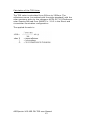
Calculation of the TSR Value:
The TSR value is calculated from 360nm to 2500nm. The
reflectance curve (normalized with the white standard) with the
solar spectrum given by the reference ASTM G173-03 Reference
solar Spectra Derived from SMARTS v. 2.9.2 in the Direct and
circumsolar illumination configuration:
The applied formula is:
ARCSpectro VIS-NIR DR-TSR user Manual
13