1
K1EL
K40FILT RTTY Filter Board Manual
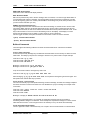
SHIFT-F2: Gain 2x Multiplier Toggle **
Use this command to enable of disable additional gain in the receive channel. Turn 2X gain off for receive
input levels in the range of 500mV to 2V of peak to peak audio. Turn 2X gain for receive levels from 100 to
500 mV.
SHIFT-F3: Diddle Toggle **
Use this command to enable or disable diddle on transmit.
SHIFT-F4: Spot Toggle **
When operating the K40 RTTY in FSK with a separate transmitter and receiver, this command provides a
means to exactly tune your receiver to your transmitter frequency. When spot is enabled, the K40 board is
set to transmit while the K40 filter board is left in receive mode. This allows the receiver to be tuned into the
transmitted RTTY stream using the K40 filter boards tuning LEDs. In addition since the K40 can transmit and
receive simultaneously, the transmitted data, once tuned in on the filter board will be displayed in the K40’s
LCD receive window.
SHIFT-F6: Tx Monitor Toggle **
Use this command to control the Tx monitor mode. When enabled (on) transmitted characters will be printed
in the Receive window in lower case.
SHIFT-F8: Tune Toggle/Test FSK **
The PTT output is turned on. The sense of the FSK output can be toggled by using the ALT-F9 command.
This allows either mark or space to be sent continuously to tune filters or test keying. Be sure to leave
transmit sense in the state you started with.
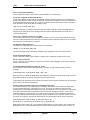
ALT Commands
The ALT command keys setup K40 RTTY operating preferences. In most cases you'll set these once, save
them to memory, and not think about them again. Remember to use the SHIFT-F1 P command to save
these settings in EEPROM so that they will be loaded next time you power up.
ALT-F1: Set RTTY/CW Mode
This is the way you put the K40 into RTTY mode. The mode will toggle each time this command is pressed.
A message on the display will tell you what mode it is changing to.
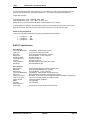
ALT-F2: PTT Lead In Delay Time
The K40 provides a transmitter PTT output that is used to switch a transmitter over to transmit mode in
advance of actual FSK transmit. A default time of 800 milliseconds is built in but you can extend it using this
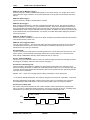
command. The time delay specifies the time between when PTT is asserted and when FSK keying will start.
The format for the command is:
ALT-F2 <nn>
where nn is a two digit number calling out the delay in 10's of milliseconds.
nn= 26 selects 260+800 milliseconds. The maximum delay that can be set is 99 or 990+800 = 1.8 seconds.
Note that a default delay of 600 mSec is used if Lead In is left at zero. It is essential to have a period of
unmodulated signal before FSK starts to insure the receiving station locks to your signal in advance.
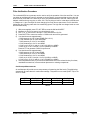
ALT-F3: PTT Tail Delay Time
Like Lead In delay the time between the end of FSK modulation and PTT deassertion is programmed in
units of 10 mSecs. A default time of 800 ms is built in. The syntax is the same as ALT-F2. A tail delay helps
transmissions to end cleanly and can help prevent stray characters at transmission end.
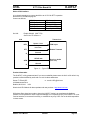
PTT
Lead-in Delay
Tail Delay
Key
Fig. 3 – Lead and Tail Illustration
K-40FILT User’s Manual rev2
2/20/2007
Page 8