1
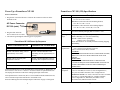
Power Up a FrameSaver NP 100
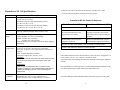
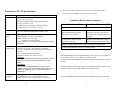
FrameSaver NP 100 (120) Specifications
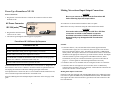
Power Connections
Item
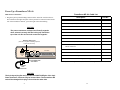
1. Plug the IEC 320 end of the Power Cord into the connector on the rear of the
FrameSaver NP.
AC Power Connector
Dimensions
Table Top (with rubber feet):
3.5" H x 10.5" W x 12.0"D.
Wall Mount (with removable wall mounting bracket):
10.5" H x 12.0" W x 3.5" D.
Rack Mount (with removable rack mounting adapter):
5.25" H x 19.0" W ( or 24.0" W ) x 12.0" D.
Weight
As normally packaged including carton and accessories: 8 lbs.
Unit alone (without packaging and accessories): 6 lbs.
Operating
Range
Temperature: 0 to 50 degrees C. operating.
Relative Humidity: 5 to 95% non-condensing.
Altitude: 10,000 ft. max. operating,
50,000 ft. max. non-operating.
Shock and Vibration: As normally encountered during shipping
and handling.
Power
Requirements
90 - 250 VAC, 50 - 60 Hz.,15 Watts max.
(100 - 240 VAC for FrameSaver NP 120)
Fused - 2A/250V Slow Blow, 5x20mm.
CAUTION:
FOR CONTINUED PROTECTION AGAINST RISK OF FIRE,
REPLACE FUSE ONLY WITH THE SAME TYPE AND
RATING.
ATTENTION:
POUR NE PAS COMPROMETTRE LA PROTECTION
CONTRE LE RISQUE D’INCENDIE REMPLACER PAR UN
FUSIBLE DE MEMES TYPE ET CARACTERISTIQUE
NOMINALES.
Regulatory
Compliance
FrameSaver NP 100: UL - 1459, Third Edition and CAN/CSA
C22.2 No. 225-M90; FCC Part 15, Class A Digital Device;
FCC part 68;Canada’s ICES003, Class A Digital Device
FrameSaver NP 120: UL-1950; CAN/CSA C22.2 No. 225-M90;
FCC Part 15, Class B Digital Device; Canada’s ICES003,
Class A Digital Device; EN 60950; EN 50082-1:1992;
EN 55022:1995; EMI: EN 55022 Class B
9 0-2 5 0 V AC
.5A
5 0-6 0 H z
IEC 320 (male)
FU S E
2 A/25 0 V
S L O W B LO W
5 x2 0 m m
"C AU TIO N "
FO R CO NTIN UED PRO TECT ION AG AINST R ISK O F FIRE,
REPLACE O NLY WITH SAME T YPE AN D RAT IN G O F FUSE.
O 1 2 3 4 5 6 7 8 9 1 0 1 11 2
N
2. Plug the other end of the
Power Cord into an AC outlet.
O 1 2
N
C O N FIG U RATIO N
C O N TRO L
O U TP U T
D ATA P O R
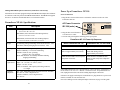
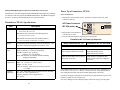
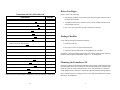
3. The unit will go through the following power-up sequence
FrameSaver NP 100 Power-Up Sequence
Basic FrameSaver NP 100
FrameSaver NP 100 with ISDN
POWER LED lights and stays on.
READY LED flashes during self-test
(approximately 60 seconds).
READY and ISDN READY LEDs
flash during self-test (approximately 60
seconds).
READY LED is ON steady after
completion of self-test.
READY and ISDN READY LEDs are
ON steady after completion of self-test.
The T1 ALARM and FR MGMT. LEDs should not be flashing together.
All other LED indications should be ignored at this time.
If the LED indications are not as described above, refer to Section 5, “Diagnostics” of
the FrameSaver NP 100 User’s Manual - Installation Guide. If operation looks normal, unplug the FrameSaver NP before making input/output connections.
If an optional Power Control Unit (PCU) is to be installed with this FrameSaver NP,
refer to instructions provided with the PCU and install it now.
Proceed to Making Network and Input/Output Connections on page 9 of this guide.
6
Description
11