1
Before You Begin
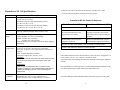
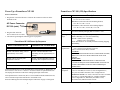
FrameSaver NP 100 (120) Cable List
Description
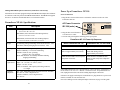
Ensure you have the following:
Part No.
• A dedicated, grounded, circuit breaker protected power outlet within six feet of
the FrameSaver NP unit.
T1 network cable, RJ-48, twisted pair (NP 100 only)
135-982-0006
Dial Line (POTS) cable, RJ-11 connector (NP 100 only)
135-007-7200
ISDN BRI network cable, RJ-49 connector (NP 100 only)
135-981-0006
EIA-530 Data Port (DTE) cable (NP 100 only)
135-002-0400
EIA-530A Data Port (DTE) cable (NP 100 only)
135-003-0400
ITU-X.21-NS Data Port (DTE) cable (NP 100 only)
135-005-0400
ITU-V.35 Data Port (DTE) cable (NP 100 only)
135-001-0400
ITU-V.35 Data Port (DTE) cable to Cisco router serial port,
HD-60 connector (NP 100 only)
135-006-0400
Console cable (to AUX2), DB-9 connector
135-000-0464
• Unit power cord or AC Power Pack with cord
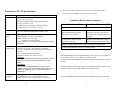
Console cable (to AUX2), DB-25 connector
135-007-0400
• If ordered, optional wall-mount or rack-mount bracket assembly.
AUX Port to router console port cable, DB-25 connector
135-008-0400
AUX Port to Cisco router console port, RJ-45 type connector
135-990-0006
ITU-V.35 Compliant network cable (NP 120 only)
135-001-0480
ITU-X.21-NS network cable (NP 120 only)
135-005-0480
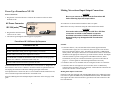
Mounting the FrameSaver NP
ITU-V.35 Compliant User Port cable (NP 120 only)
135-002-0480
EIA-530 User Port cable (NP 120 only)
135-003-0480
EIA-530A User Port cable (NP 120 only)
135-004-0480
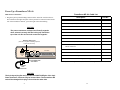
FrameSaver NP units come equipped with rubber feet for table or shelf-top placement.
Optional adapter brackets are available for wall mounting (Model 64+ includes wallmount key-holes in its base) and standard 19" or 24" rack mounting. To attach and
mount adapter brackets, follow the instructions supplied with the mounting adapters.
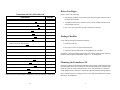
• A suitable location for the unit that is clean, well-lit, ventilated and free from
environmental extremes.
• One to two feet of clearance for cable connections to the unit.
Package Checklist
Verify that the packaging contains the following:
• FrameSaver NP unit
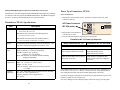
Contact your service representative, distributor or sales representative to order cables.
14
In addition, you will need Input/Output cables if not already supplied. These cables are
listed for each FrameSaver NP Model on pages 13 - 15 of this guide.
Allow sufficient space for cooling and access to the front panel indicators for troubleshooting in all installations.
3