1
Assistance
The toll-free numbers are available
Camcorder
Custmner
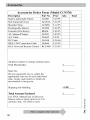
Accessories
Getting
Exchange
Warranty
to help with any problem
..................
you may encounter.
800-283-6503
(pages 72-73)
Service ........................................
800-336-1900
(page 7l)
.................................................
800-338-0376
(pages 57-62)
Started
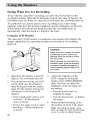
This section describes the steps necessary- to set up your camcorder to record.
Refer to the other sections tor detailed operation and feature options.
1.
Unpack
the camcnrder
and accessories.
• Save all packing materials and box in case the camcorder ever needs to
be shipped or stored.
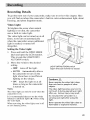
• The items shown are packed with the camcorder. If any pieces are
missing or appear damaged, contact your dealer immediately.
• Remove the plastic fihn that covers the front and side logos on the
camcorder. Use a fingernail, not anything sharp, to remove.
Core Filter for Optional
S-Video cable
(see page 74 for details)
Lithium-ion Battery
Part No 247800
Never use the adapter/
charger
for any purpose
Model CC9370
AC Adapter/Charger
Shoulder Strap
Part No. ACS091
IEEE 1394
Connection Cable
Part No. 249644
Part No. 247801
other
than charging
247800
battery pack
the optional
BB46L)
Supplying
powe[ to
camcorder.
Audio/Video Cable
Part No. 249645
the
(or
or for
the
DC Cable
Part No. 244268
3