1
Atomos Ninja-2 ~ Quick Start Guide
Download the full User Manual from:
http://www.atomos.com/support
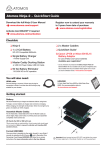
Checklist:
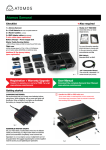
2 x Master Caddies
+ space for 5
Ninja-2
+ space for HDMI* Cables.
* (cables not included).
Master Caddy
Docking Station
2 x *2-Cell Batteries
NP-570 Compatible
2600mAh
+ USB 2.0 Power Cable,
+ USB 3.0 Cable
+ FireWire® 800 Cable
+ space for *4-Cell
or *6-Cell Batteries
Carry Case &
Shoulder Strap
fig. 2
Battery Charger + Power Supply Unit
You will also need:
HDMI cable
One end having a common 13.9mm type A plug
for connection to Ninja-2, and the other end
having a plug suitable for your camera.
HDD/SSD
2.5 inch Hard Disk Drive [HDD] or Solid State
Drive [SSD]. For recommendations refer to:
> http://www.atomos.com/support
Getting started:
fig. 3
Batteries
on Charger
1
Batteries: We recommend that you charge new batteries before
using them. While charging, one or more red lights will illuminate.
When all four lights are flashing, the battery is 90% charged and
ready for use. When all the lights go off, trickle charge is complete
and the battery is 100% charged. To extend the life of your batteries
we recommend charging to 90% when all four lights are flashing.
Assemble Master Caddy: Fix the Hard Disk or Solid State Drive
into the Master Caddy as shown (fig. 4). Align screw holes on all three
pieces and assemble completely. Insert screws last.
fig. 4
Important: Insert screws last and DO NOT over-tighten the screws or
proper alignment of the Master Caddy can not be guaranteed.
Once your drive is inserted into the caddy, format it in your Ninja-2
recorder by selecting the BLUE arrow next to Recording Time
Remaining, Press Format HDD/SSD and follow the on-screen
instructions. For more information refer to the User Manual.
2
Handle the HDD or SSD with care
Touch screw holes or metal shell first. Avoid contact with circuit board and
connectors. Refer to manual
Atomos Ninja-2 ~ Quick Start Guide
Connect & power-up
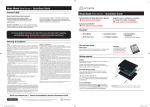
Attach Batteries:
Ninja-2 Must power up
using battery slot 1 ONLY
Battery number 1
Gently slide down into battery
slot/s and lock into position.
Connect one or both batteries to the Ninja-2.
Make sure to use the battery slot marked with
the number “1” as you should consider this
your primary battery. The other battery is a
secondary/back-up battery. [e.g battery slot #2]
Push latch to release battery
The Ninja-2 utilises only one battery at a time.
This way a battery can be removed, charged
and replaced during operation. Refer to the
User Manual for more information.
IMPORTANT Ninja-2 can only power up / turn on
from the Primary battery position. [Battery Slot #1]
fig. 5
CONNECT:
Eject Button: HDD / SSD
To eject Master Caddy, slide the
latch on the side of the Ninja-2 and
pull out Master Caddy from the slot.
The Master Caddy is hot-swappable
so you can do this at any time...
except while actively recording.
Video Input
Connect camera Video or
other source device to the
Ninja-2 using a HDMI cable.
Video Output
Loop or Play out to an
external HDMI TV/Monitor
POWER:
Media Storage:
On/Off
Insert Master Caddy into the
Ninja-2 until it clicks into
position.
Audio
Stereo Line In
Stereo Line Out
or Headphones
Briefly press the circular button on
the side of the Ninja-2 to power-up
the unit.
fig. 6
fig. 7
Mount
To shut down, depress button for at
least 4 seconds (until unit turns off)
Mount the Ninja-2 on or between the camera or tripod
using the standard 1/4” inch tripod screw mounts top and bottom.
CAUTION: The Ninja-2 is constructed from aluminium which acts as the unit’s heat sink. In high or extreme temperatures / climates, the metal chassis
may feel slightly warm / hot to touch. This is completely normal and does not in any way effect the overall functionality of the Ninja-2.
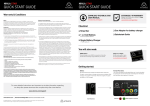
Main Controls: One-touch Operation [ Simple Touchscreen Interface ]
The Ninja-2 is controlled by a simple
user-friendly touchscreen interface.
Please find herewith a brief description
of the main controls seen when the
Ninja-2 is first powered up. Please refer
to the User Manual for more details.
Pay special attention to any items on
screen which are marked by a small blue
arrow. Touch these items to access or
cycle thru related options.
A larger blue arrow in the top right
corner of the screen will return you
from other menus to the main controls.
at omos.com
Codec used for recording
Battery power
remaining
Current video input
format and status
Currently
active battery
1 or 2
Rolling
timecode
trigger
fig. 8
Audio input
level meters
Easy to use
Touch screen
Interface
Headphone Line
Out volume
Recording time
remaining
© ATOMOS Global Pty. Ltd. trading as ATOMOS under license August 2012. All trademarks are the property of their respective owners.
Atomos reserves the right to change or alter any product specifications without notice.
Atomos Ninja-2 ~ Quick Start Guide
Record & Record While Monitoring
Main Interface:
fig. 9
fig. 10
Monitor & Record: Configurations
Record while Monitoring
Press to Record in Monitor Mode
Record:
Press to start/stop recording.
Smart Log: Smart Log Mode
Play: Enter playback mode
Back: Takes user back to the
main control screen (Refer fig. 9)
Monitor: Enter monitor mode
Smart monitor
Menu: Device settings / options
Headphone line-out
volume adjustment
Rolling Timecode Record trigger
Headphones: Volume adjustment
Timecode Display
Audio Indicator: The Audio Levels associated with the current Recording
Audio Indicator: The Audio Levels associated with the current Recording
Monitor & Assist: One-touch Monitoring
Monitoring: Main Interface
fig. 11
fig. 12
Smart Monitor: Activates
monitor assist options / tools
Smart Monitor Interface
Focus Assist: Peaking
Exposure Assist: Zebra
Headphone Line-out
Volume Adjustment
False Colour Twin Mode
Blue Only: Exposure Check
Record in monitor mode
Monitor Assist: Control
adjustments for individual filters
Smart Log
Audio Indicator: The audio levels associated with the current recording
Back Arow: Takes User Back to the previous screen
Playback & Edit: One-touch Review
Smart Log: Tagging Interface
fig. 13
fig. 14
Back: Back to previous page
Super RWD / Super FFWD
Smart Log
Play: Press to play clip
Smart Monitor Mode
Loop IN Point
Playback: Play, Loop & Scrub
Jump to beginning / end
Frame by Frame: RWD / FFWD
Loop: Loop Playback
SmartLog: Clear all smartlog tags
Loop OUT Point
Timecode Display
Tagged Clips: Areas of the video clip can be tagged & highlighted
Tag for Favourite: Touch once to set the IN point. Touch again to set OUT point.
Timecode Display Indicator: Video clip playback information
Tag for Reject: Touch once to set the IN point. Touch again to set OUT point.
Connect & edit
Master Caddy Docking Station:
To access and edit your recorded material:
Connect the Master Caddy Docking Station to a Mac® or Windows® editing
workstation via FireWire® 800, USB 2.0 and/or USB 3.0 compatible port/s.
Insert
Master
Caddy
When using USB, you may also need to connect power to the Docking Station
using the included USB power cable and connecting it to a USB 2.0 port. Try this if
you encounter problems.
Ready to edit:
Finally, eject the Master Caddy from the Ninja-2 and insert it into the Docking
Station. After a short wait your recorded video will become accessible as a
standard external disk (Native ExFAT / FAT32 formatted disc/s also supported).
Optional power input
May be required when
and if using USB 3.0
fig. 15
2x FireWire
800® ports
1x USB 2.0 / 3.0 compatible port
ATTENTION: For more detailed instructions and important up-to-date information regarding
the Ninja-2 please consult the user manual available for download from
http://www.atomos.com/support
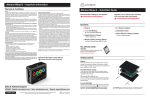
Atomos Ninja-2 ~ Important information
Warranty & Conditions
Notice
Copyright © 2012 ATOMOS Global Pty Ltd (‘referred to as ATOMOS’). All rights reserved. All
information in this document is subject to change without notice. No part of the document may
be reproduced or transmitted in any form, or by any means, electronic or mechanical, including
photocopying or recording, without the express written permission of ATOMOS. A reference to
ATOMOS includes its related entities, subsidiaries and parent company.
Trademarks
NINJA / NINJA-2 / ATOMOS are registered trademarks of ATOMOS Pty Ltd. Apple, the Apple logo,
AppleShare, AppleTalk, FireWire, iPod, iPod Touch, Mac, and Macintosh are registered trademarks
of Apple Inc. Final Cut Pro, QuickTime and the QuickTime Logo are trademarks of Apple Inc. All
other trademarks are the property of their respective holders.
International Hardware Limited Warranty (1 Year Standard/3 Years if registered)
ATOMOS warrants that:
• the main product, not including TFT/LCD, or any external accessories, will be free from defects
in materials and workmanship for a period of 1 year from the date of purchase; or 3 years upon
completion of product registration at www.atomos.com
• the TFT/LCD, batteries, battery charger, HDD/SSD docking station, case and master caddies will
be free from defects in materials and workmanship for a period of 1 year from the date of purchase
regardless of registration.
This warranty is exclusively for the benefit of the original purchaser and is not assignable or
transferable.
If during the warranty period the product is shown to be defective ATOMOS may at its option:
a) replace the goods or supply equivalent ones, b) repair the goods, c) pay the cost of replacing the
goods or of acquiring equivalent ones and d)paying the cost of having the goods repaired;
The customer must notify ATOMOS of any defect in the goods in writing prior to the expiry of the
warranty periods set out above. The customer will be solely responsible for returning the goods to
ATOMOS or its authorized distributor. Upon acceptance of a warranty claim by ATOMOS, where
ATOMOS repairs or replaces the goods, it will be responsible for reasonable shipping costs incurred
in sending the goods to the Customer, provided that customer is located in a country in which
ATOMOS has an authorized distributor or repair centre or agent.
Warranty Exclusions
This warranty applies only to defects in workmanship and does not cover defects caused by:
• A failure to comply with the then current operating instructions issued by ATOMOS;
• Neglect;
• Improper or negligent acts or omissions;
• Unauthorised repairs or attempted repairs;
• Tampering with or modification of the goods;
• Connection to incompatible equipment or power sources;
• Exposure to water or weather;
• Exposure to magnetic fields or corrosive liquids or substances;
EXCEPT AS STATED IN THIS WARRANTY, ATOMOS, IT’S VENDORS, AGENTS, RESELLERS AND DISTRIBUTORS
DISCLAIM IN THEIR ENTIRETY ALL OTHER WARRANTIES, EXPRESS OR IMPLIED, INCLUDING WITHOUT LIMITATION
ALL WARRANTIES OF MERCHANTABILITY OR FITNESS FOR A PARTICULAR PURPOSE. THE REMEDIES OUTLINED
IN THIS WARRANTY ARE THE EXCLUSIVE REMEDY A CUSTOMER HAS ARISING FROM DEFECTIVE GOODS WHICH
ARE SUBJECT TO THE WARRANTY.
ATOMOS DOES NOT WARRANT THAT THE GOODS WILL OPERATE IN A MANNER WHICH IS ERROR FREE, OR
UNINTERRUPTED. THE GOODS ARE NOT INTENDED TO BE THE PRIMARY OR ONLY DATA STORAGE DEVICE FOR
Software License Agreement
IMPORTANT, PLEASE READ CAREFULLY. THIS IS A LICENSE AGREEMENT.
This ATOMOS software, related documentation, any included sample images and other files (the
“Software”), is protected by copyright laws and international copyright treaties, as well as other
intellectual property laws and treaties. The Software is licensed, not sold.
This End User License Agreement (“EULA”) is a legal agreement between you (either an individual
or a single entity) and ATOMOS with regard to the copyrighted Software provided with this EULA.
Use of the Software provided to you by ATOMOS in whatever form or media, will constitute your
acceptance of these terms, unless separate terms are provided by the software supplier, in which
case certain additional or different terms may apply. If you do not agree with the terms of this EULA,
do not download, install copy or use the Software. By installing, copying or otherwise using the
Software, you agree to be bound to the terms of this EULA. If you do not agree to the terms of this
EULA, ATOMOS is unwilling to license the Software to you.
1.Eligible licensees. This Software is available for license solely to purchasers of the ATOMOS
Ninja, who have purchased a unit manufactured by ATOMOS Ninja-2 and purchased through an
ATOMOS authorized reseller, with no right of duplication or further distribution, licensing or sublicensing.
2.License Grant. ATOMOS grants you a personal, non-transferable and non-exclusive right to use
the copy of the Software provided with this EULA. You agree you will not copy the Software
except as necessary to use it with the ATOMOS Ninja-2. You agree that you may not copy
the written materials accompanying the Software. Modifying, reverse engineering, translating,
renting, copying, transferring or assigning all or part of the Software or any rights granted
hereunder, to any other persons or reverse engineering the hardware on which the Software
runs, is strictly prohibited. The software is license, not sold. You acknowledge that no title to
intellectual property in the Software is transferable to you. You further acknowledge that title
and full ownership rights to the Software will remain the exclusive property of ATOMOS and/or
its suppliers, and you will not acquire any rights to the Software, except as expressly set forth
above. All copies of the software will contain the same proprietary notices as contained in or
on the Software. All title and copyrights in and to the Software (including but not limited to any
images, animations, video, audio, text incorporated), the accompanying printed materials, and any
copies of the Software are owned by ATOMOS or its suppliers.
3.Reverse engineering. You agree that you will not attempt, and if you are a corporation, you will
use your best efforts to prevent your employees and contractors from attempting to reverse
compile, derive circuits, modify, translate or disassemble the Software and/or the ATOMOS
Ninja-2 in whole or in part. Any failure to comply with the above or any other terms and conditions
contained herein will result in the automatic termination of this license and the reversion of the
rights granted hereunder by ATOMOS.
ATOMOS reserves the right to terminate this license without prejudice to any additional recourse
ATOMOS may have against you if you violate any of its terms and conditions.
NOTE: Refer to the full user manual for comprehensive legal obligations when purchasing the Ninja-2.
VIEW / DOWNLOAD THE USER MANUAL VIA: > www.atomos.com/support
Download the User Manual from:
http://www.atomos.com/support
DATA – CUSTOMERS ARE SOLELY RESPONSIBLE FOR BACK UP AND PROTECTION OF DATA.
fig. 1
Sales & Technical Support
ATOMOS – Website: www.atomos.com | Sales: [email protected] | Support: [email protected]
at omos.com
© ATOMOS Global Pty. Ltd. trading as ATOMOS under license August 2012. All trademarks are the property of their respective owners.
Atomos reserves the right to change or alter any product specifications without notice.