1
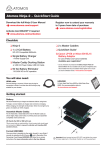
Atomos Ninja-2 ~ Quick Start Guide
Connect & power-up
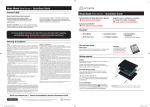
Attach Batteries:
Ninja-2 Must power up
using battery slot 1 ONLY
Battery number 1
Gently slide down into battery
slot/s and lock into position.
Connect one or both batteries to the Ninja-2.
Make sure to use the battery slot marked with
the number “1” as you should consider this
your primary battery. The other battery is a
secondary/back-up battery. [e.g battery slot #2]
Push latch to release battery
The Ninja-2 utilises only one battery at a time.
This way a battery can be removed, charged
and replaced during operation. Refer to the
User Manual for more information.
IMPORTANT Ninja-2 can only power up / turn on
from the Primary battery position. [Battery Slot #1]
fig. 5
CONNECT:
Eject Button: HDD / SSD
To eject Master Caddy, slide the
latch on the side of the Ninja-2 and
pull out Master Caddy from the slot.
The Master Caddy is hot-swappable
so you can do this at any time...
except while actively recording.
Video Input
Connect camera Video or
other source device to the
Ninja-2 using a HDMI cable.
Video Output
Loop or Play out to an
external HDMI TV/Monitor
POWER:
Media Storage:
On/Off
Insert Master Caddy into the
Ninja-2 until it clicks into
position.
Audio
Stereo Line In
Stereo Line Out
or Headphones
Briefly press the circular button on
the side of the Ninja-2 to power-up
the unit.
fig. 6
fig. 7
Mount
To shut down, depress button for at
least 4 seconds (until unit turns off)
Mount the Ninja-2 on or between the camera or tripod
using the standard 1/4” inch tripod screw mounts top and bottom.
CAUTION: The Ninja-2 is constructed from aluminium which acts as the unit’s heat sink. In high or extreme temperatures / climates, the metal chassis
may feel slightly warm / hot to touch. This is completely normal and does not in any way effect the overall functionality of the Ninja-2.
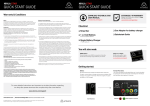
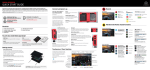
Main Controls: One-touch Operation [ Simple Touchscreen Interface ]
The Ninja-2 is controlled by a simple
user-friendly touchscreen interface.
Please find herewith a brief description
of the main controls seen when the
Ninja-2 is first powered up. Please refer
to the User Manual for more details.
Pay special attention to any items on
screen which are marked by a small blue
arrow. Touch these items to access or
cycle thru related options.
A larger blue arrow in the top right
corner of the screen will return you
from other menus to the main controls.
at omos.com
Codec used for recording
Battery power
remaining
Current video input
format and status
Currently
active battery
1 or 2
Rolling
timecode
trigger
fig. 8
Audio input
level meters
Easy to use
Touch screen
Interface
Headphone Line
Out volume
Recording time
remaining
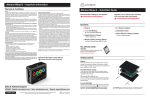
© ATOMOS Global Pty. Ltd. trading as ATOMOS under license August 2012. All trademarks are the property of their respective owners.
Atomos reserves the right to change or alter any product specifications without notice.