1
7 K EY REFERENCES
Note: A ‘+’ sign indicates that both keys / mouse strokes have to be performed simultaneously. LMB / RMB
indicates a left / right mouse button click.
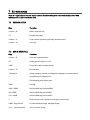
7.1 SESSION SETUP
Key
Function
Control + N
Start a new session
F1
Display help page
Control + O
Load session (resume previously saved session)
Control + Q
Exit iTag
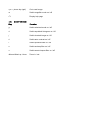
7.2 MAIN INTERFACE
Key
Function
Control + S
Save the current session
F9
Switch general panel on / off
LMB
On panel image: navigate image
Control + Q
End session
1 through 9
Select category (number of categories depends on session setup)
+
Increase tag size display size
-
Decrease tag size display size
RMB
Add tag
Shift + RMB
Add modified tag (shift modifier)
Alt + RMB
Add modified tag (alt modifier)
Ctrl + RMB
Add modified tag (ctrl modifier)
x
Enter eraser mode; right click near tag to remove tag
LMB + drag mouse
In main interface image: Navigate image
w or ← (arrow key left)
Go to previous image