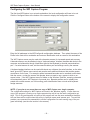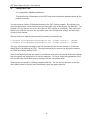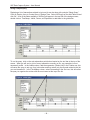
1
WIP Data Capture System - User Manual
Introduction
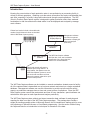
Knowing the current status of each production order in a manufacturing or processing facility is
critical to efficient operations. Obtaining up-to-the-minute information can require considerable time
and effort, especially if a facility is large and orders travel through several operations. The WIP
(Work In Process) Data Capture system is designed to gather production status from scattered
workstations in real time and store the data where it can be displayed and analyzed by management software.
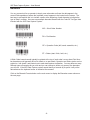
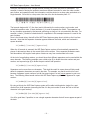
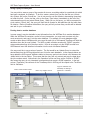
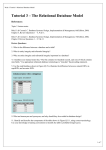
Printed work orders include a barcoded order
number (Code 39 barcode fonts are included
with the WIP Data Capture system)
Management Software Management software
can use the captured
Displays/Reports
information to display job
status and analyze
productivity.
*WO4095*
WORK ORDER
*WO4095*
○ ○
○ ○
○
○
○ ○
○ ○
Job Information
Database
WIP Data Capture
software
WORK ORDER
*WO4095*
The WIP Data Capture software
adds the date, time, and workstation
identification, then stores the information on a central database.
Work order travels with parts to
different processing stations. At
each station, the operator uses the
WIP Data Capture System to record
the work order and the work done.
Barcode scanners make this a quick
and accurate process.
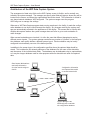
The WIP Data Capture software can be installed on several workstations located around a facility;
all of the captured data is transmitted over a local area network and stored on a single centralized
database. Management software can use this information to provide up-to-the-minute activity
reports, so production managers have a clear and current picture of operations. Since the WIP
Data Capture system records the precise date and time of every transaction, special software can
calculate the time spent on each operation and analyze productivity.
The WIP Data Capture system collects and stores transaction data; software for analyzing and
reporting the data is not part of the WIP Data Capture package.. The package does include a
simple job tracking example written in Microsoft Access; this is intended as a starting point for users
with experience in Microsoft Access or Visual Basic programming. See the section entitled Using
the Captured Data for an introduction to techniques for extraction of the data.
-2-