1
WIP Data Capture System - User Manual
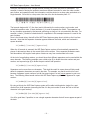
Architecture of the WIP Data Capture System
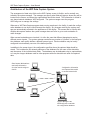
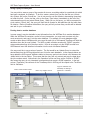
The arrangement of data entry fields on the WIP Capture screen is flexible, and is centrally controlled by the system manager. The manager can specify what fields will appear, where they will be
located on the screen, and where the captured data should be stored. This information is stored in
one shared network database, WIPConfig.mdb. The system manager uses the program
WIPConfig.exe to manage the settings.
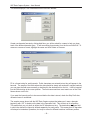
Whenever a WIP Data Capture program starts running anywhere in the facility, it reads the configuration database to see how it should arrange the display. Any changes made by the system manager are automatically reflected in the appearance of the display. This means that in a facility with
multiple data capture stations the system manager does not have to go to each workstation to
make changes.
When several workstations are involved, it is often the case that different departments require
different screen layouts. The system manager can define any number of “profiles” in the configuration database; each profile defines a different screen layout. Each workstation may be locally
configured to automatically use one of the defined profiles.
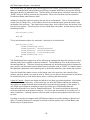
In addition to the screen layout, the configuration specifies where the captured data should be
stored. This includes the full network pathname of the database file, the name of the data table,
and the names of the individual data fields. The database may be dedicated soley to captured data,
or it may be a larger database used for other purposes with one data table set aside for captured
data.
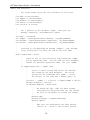
Data Capture Workstations
read setup information
from the central configuration file
Configuration information
and captured data reside
on central network disk
System Manager uses
WIPConfig.exe to maintain
the configuration database
-3-